Configure digital inputs DI3/DI4 for detecting a pulse train
In case of the inverter, the digital inputs DI3 and DI4 can be configured as HTL input to evaluate the signal of a cost-effective HTL encoder or a reference frequency ("pulse train").
The inverter can adopt a reference frequency (also referred to as pulse train) as a setpoint signal.

The digital inputs which are able to assume a frequency setpoint are generally the same digital inputs that are able to accept an HTL encoder. Therefore, it is not possible to use the frequency input and the encoder input at the same time.
The digital inputs of the inverter have a maximum frequency limit. Exceeding the maximum frequency input leads to an error. See details in chapter "Settings of the encoder monitoring".
Preconditions
In order to use the digital inputs DI3 and DI4 as HTL input, the corresponding input function must be set.  0x2630:002 (P410.02)
0x2630:002 (P410.02)Details
The digital inputs must be configured such that they detect the frequency input signal. This happens in 0x2630:002 (P410.02).
a.
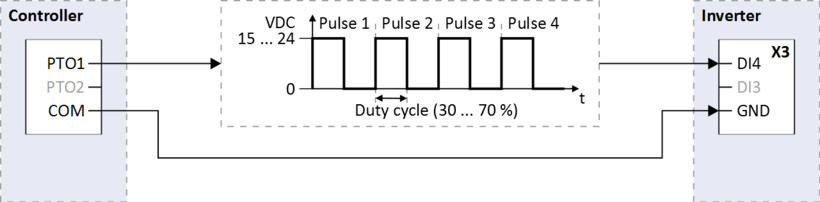
Input function 0x2630:002 (P410.02) = "Pulse train [2]"
(DI4 = input for pulse train, DI3 = normal digital input)
This selection configures the digital inputs to detect the frequency signal, whereby DI4 is configured to detect the frequency input signal (pulse train).
(DI4 = input for pulse train, DI3 = normal digital input)
This selection configures the digital inputs to detect the frequency signal, whereby DI4 is configured to detect the frequency input signal (pulse train).
b.
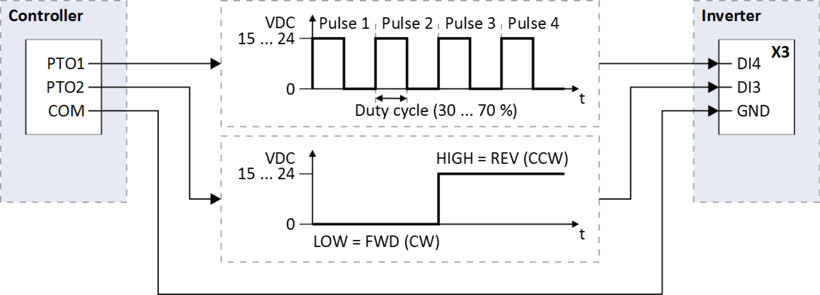
Input function 0x2630:002 (P410.02) = "Pulse train/direction [3]"
(DI4 = input for pulse train, DI3 = input for specification of direction)
This selection configures the digital inputs to detect the frequency and directional signals, whereby the digital input DI4 is configured to detect the frequency input signal (pulse train) and DI3 is configured to detect the directional signal.
(DI4 = input for pulse train, DI3 = input for specification of direction)
This selection configures the digital inputs to detect the frequency and directional signals, whereby the digital input DI4 is configured to detect the frequency input signal (pulse train) and DI3 is configured to detect the directional signal.
Scaling
The scaling of the frequency signal in relation to the setpoint range takes place in two steps can be configured as follows:
–
Identify the minimum and maximum frequency of the frequency signal (pulse train).
–
Set the minimum frequency value (Hz). 0x2640:001 (P415.01)
0x2640:001 (P415.01)
When DI3 is used to control the pulse train 0x2630:002 (P410.02) = [3], this value must be configured to the corresponding NEGATIVE pulse frequency value.
Range
Configure the range for the setpoint, which corresponds to the minimum and maximum frequency of the frequency signal (pulse train).
Frequency setpoint:
Process control:
Torque setpoint:
Filter
Filter time constant: in normal operation, the standard value is sufficient for executing this function. 0x2640:009 (P415.09)
0x2640:009 (P415.09)Monitoring
It is also possible for the inverter to monitor the frequency input and generate a response when the frequency input falls below a predetermined frequency value and / or rises above a predetermined frequency value.
Configuration of inverter monitoring:
–
Set maximum frequency threshold to the highest valid input frequency (in Hz). 0x2641:003 (P416.03)
0x2641:003 (P416.03)–
Set minimum deceleration threshold to the time period for which the input frequency needs to fall below the minimum threshold in order to cause an error status. 0x2641:002 (P416.02)
0x2641:002 (P416.02)–
Set maximum deceleration threshold to the time period for which the input frequency needs to exceed the maximum threshold in order to cause an error status. 0x2641:004 (P416.04)
0x2641:004 (P416.04)–
Set monitoring conditions. 0x2641:005 (P416.05)
0x2641:005 (P416.05)–
Set the error response to the desired action that occurs when the error "Frequency input monitoring error" is triggered. 0x2641:006 (P416.06)
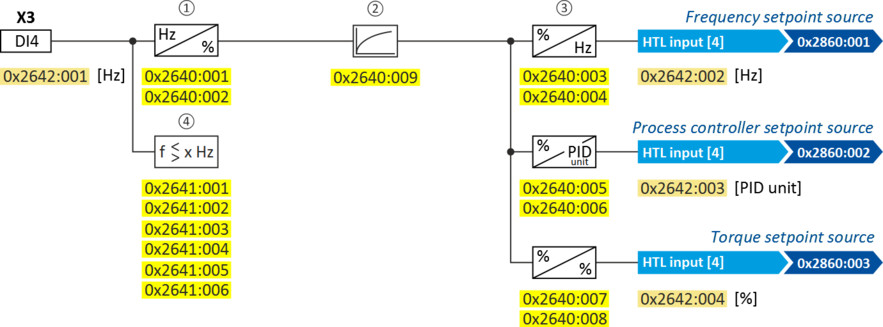
0x2641:006 (P416.06)The following settings are possible for the HTL input:
–
Definition of the input range ①
–
Filter time for low-pass filters ②
–
Definition of the setting range ③
–
Monitoring of the input signal ④
Intended use
The HTL input can be used for the following tasks:
–
As a standard setpoint source
|
Intended use
|
Parameter
|
Setting
|
Further information
|
|
As a setpoint source for specifying a frequency setpoint.
|
HTL input [4]
|
Frequency control
 Standard setpoint source Standard setpoint source |
|
|
As setpoint source for defining the reference value for the process controller.
|
HTL input [4]
|
Frequency control
Configuring the process controller |
|
|
As a setpoint source for specifying a torque setpoint.
|
HTL input [4]
|
Torque control
Standard setpoint source |
|
|
As an alternative to the setting as a standard setpoint source, the "Activate setpoint via HTL input" 0x2631:022 (P400.22) function can be used to enable a setpoint change-over to the HTL input.
|
|||
–
As an actual value source or feedforward source for the following functions:
|
Intended use
|
Parameter
|
Setting
|
Further information
|
|
As an actual value source for the process controller.
|
HTL input [6]
|
Frequency control
Configuring the process controller |
|
|
As a speed feedforward source for the process controller.
|
HTL input [9]
|
Configuration examples
Detailed configuration examples can be found in the following subchapters:
Parameter
|
Address
|
Name / setting range / [default setting]
|
Information
|
|
|
0x2640:001
(P415.01)
|
HTL input settings: Minimum frequency
(HTL inp. setting: Min.frequency)
-100000.0 ... [0.0] ... 100000.0 Hz
–
From version 04.00
|
Definition of the input range of the HTL input.
When DI3 is used to control the pulse train [0x2630: 002 = 3], this value must be configured to the corresponding NEGATIVE pulse frequency value. |
|
|
0x2640:002
(P415.02)
|
HTL input settings: Maximum frequency
(HTL inp. setting: Max. frequency)
-100000.0 ... [0.0] ... 100000.0 Hz
–
From version 04.00
|
Definition of the input range of the HTL input.
|
|
|
0x2640:003
(P415.03)
|
HTL input settings: Minimum motor frequency
(HTL inp. setting: Min.motor.freq)
-1000.0 ... [0.0] ... 1000.0 Hz
–
From version 04.00
|
Definition of the setting range for operating mode "MS: Velocity mode".
–
Direction of rotation according to sign.
–
The standard setpoint source for operating
mode 0x6060 (P301.00) = "MS: Velocity mode [-2]" is selected in 0x2860:001 (P201.01).
|
|
|
0x2640:004
(P415.04)
|
HTL input settings: Maximum motor frequency
(HTL inp. setting: Max.motor.freq)
Device for 50-Hz mains: -1000.0 ... [50.0] ... 1000.0 Hz
Device for 60-Hz mains: -1000.0 ... [60.0] ... 1000.0 Hz
–
From version 04.00
|
||
|
0x2640:005
(P415.05)
|
HTL input settings: Minimum PID setpoint
(HTL inp. setting: Min.PID setpoint)
-300.00 ... [0.00] ... 300.00 PID unit
–
From version 04.00
|
Definition of the setting range for PID control.
–
The standard setpoint source for the reference
value of PID control is selected in 0x2860:002 (P201.02).
|
|
|
0x2640:006
(P415.06)
|
HTL input settings: Maximum PID setpoint
(HTL inp. setting: Max.PID setpoint)
-300.00 ... [100.00] ... 300.00 PID unit
–
From version 04.00
|
||
|
0x2640:007
(P415.07)
|
HTL input settings: Minimum torque setpoint
(HTL inp. setting: Min.torque setp.)
-400.0 ... [0.0] ... 400.0 %
–
From version 04.00
|
Definition of the setting range for operating mode "MS: Torque mode".
–
100 % = Rated motor torque 0x6076 (P325.00)
–
Direction of rotation according to sign.
–
The standard setpoint source for operating mode 0x6060 (P301.00) = "MS: Torque mode [-1]" is selected in 0x2860:003 (P201.03).
|
|
|
0x2640:008
(P415.08)
|
HTL input settings: Maximum torque setpoint
(HTL inp. setting: Max.torque setp)
-400.0 ... [100.0] ... 400.0 %
–
From version 04.00
|
||
|
0x2640:009
(P415.09)
|
HTL input settings: IN1 Filter time constant
(HTL inp. setting: IN1 Filter time)
0 ... [10] ... 10000 ms
–
From version 04.00
|
PT1 time constant for low-pass filter.
|
|
|
0x2641:001
(P416.01)
|
HTL input monitoring: IN1 Minimal frequency threshold
(HTL inp. monit.: In1min.f.thresh.)
-214748364.8 ... [0.0] ... 214748364.7 Hz
–
From version 04.00
|
Settings for the minimum frequency threshold for the monitoring of the HTL input.
|
|
|
0x2641:002
(P416.02)
|
HTL input monitoring: IN1 Minimum delay threshold
(HTL inp. monit.: In1min.d thres)
0.0 ... [5.0] ... 300.0 s
–
From version 04.00
|
||
|
0x2641:003
(P416.03)
|
HTL input monitoring: IN1 Maximal frequency threshold
(HTL inp. monit.: In1max.f.thresh.)
-214748364.8 ... [0.0] ... 214748364.7 Hz
–
From version 04.00
|
Settings for the maximum frequency threshold for the monitoring of the HTL input.
|
|
|
0x2641:004
(P416.04)
|
HTL input monitoring: IN1 Maximum delay threshold
(HTL inp. monit.: In1max.d thres)
0.0 ... [5.0] ... 300.0 s
–
From version 04.00
|
||
|
0x2641:005
(P416.05)
|
HTL input monitoring: IN 1Monitoring conditions
(HTL inp. monit.: In1 condition)
–
From version 04.00
|
||
|
1
|
Below minimum frequency
|
Input frequency < minimum frequency threshold 0x2641:001 (P416.01) longer than the deceleration 0x2641:002 (P416.02).
|
|
|
2
|
Above maximum frequency
|
Input frequency > maximum frequency threshold 0x2641:003 (P416.03) longer than the deceleration 0x2641:004 (P416.04).
|
|
|
3
|
Below min. or above max. frequency
|
Input frequency < minimum frequency threshold 0x2641:001 (P416.01) longer than the deceleration 0x2641:002 (P416.02) OR input frequency > maximum frequency threshold 0x2641:003 (P416.03) longer than the deceleration 0x2641:004 (P416.04).
|
|
|
0x2641:006
(P416.06)
|
HTL input monitoring: IN1 Error response
(HTL inp. monit.: In1Err response)
–
From version 04.00
|
Selection of the response to the triggering of the HTL input monitoring.
|
|
|
0
|
No response
|
||
|
1
|
Warning
|
||
|
2
|
Trouble
|
||
|
3
|
Fault
|
||
|
0x2642:001
(P115.01)
|
HTL input diagnostics: Input frequency
(HTL inp. diag.: Input frequency)
–
Read only: x.x Hz
–
From version 04.00
|
Display of the current input value at the HTL input.
|
|
|
0x2642:002
(P115.02)
|
HTL input diagnostics: Frequency setpoint
(HTL inp. diag.: Freq. setpoint)
–
Read only: x.x Hz
–
From version 04.00
|
Display of the current input value at the HTL input scaled as frequency value.
–
The standard setpoint source for operating
mode 0x6060 (P301.00) = "MS: Velocity mode [-2]" is selected in 0x2860:001 (P201.01).
|
|
|
0x2642:003
(P115.03)
|
HTL input diagnostics: PID setpoint
(HTL inp. diag.: PID setpoint)
–
Read only: x.xx PID unit
–
From version 04.00
|
Display of the current input value at the HTL input scaled as process controller value.
–
The standard setpoint source for the reference
value of PID control is selected in 0x2860:002 (P201.02).
|
|
|
0x2642:004
(P115.04)
|
HTL input diagnostics: Torque setpoint
(HTL inp. diag.: Torque setpoint)
–
Read only: x.x %
–
From version 04.00
|
Display of the current input value at the HTL input scaled as torque value in percent.
–
100 % = Rated motor torque 0x6076 (P325.00)
–
The standard setpoint source for operating mode 0x6060 (P301.00) = "MS: Torque mode [-1]" is selected in 0x2860:003 (P201.03).
|
|