Example 3: Pulse train as frequency setpoint source
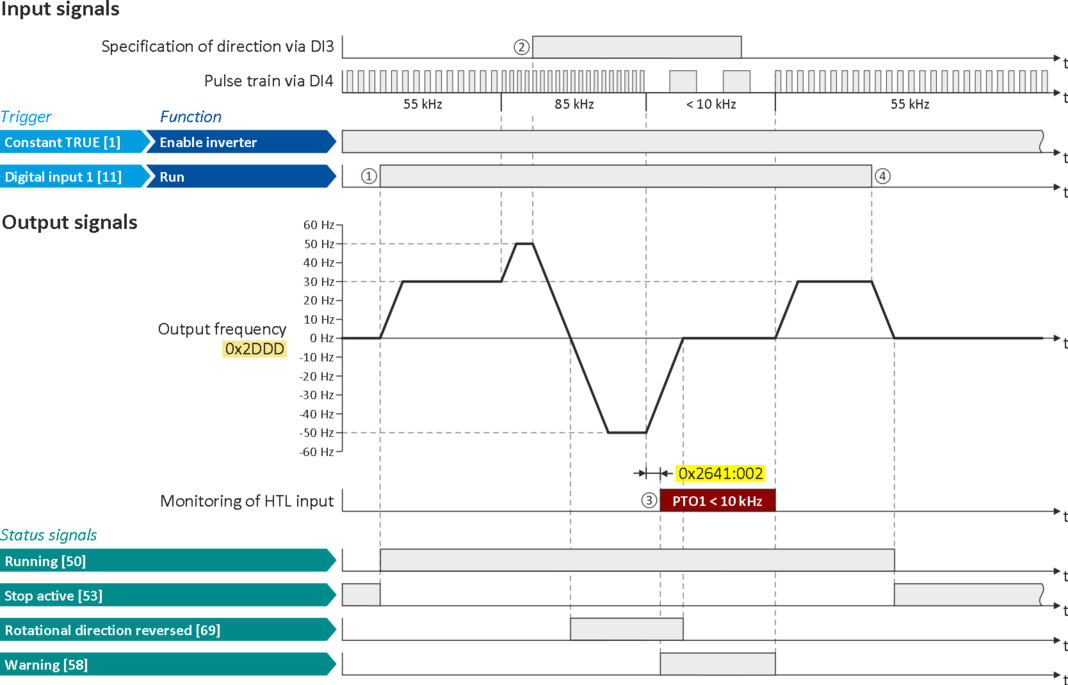
This example shows a configuration to control the frequency setpoint of the inverter via pulse train:
–
Switch S1 starts the motor. Switch S1 in initial position stops the motor again.
–
Scaling of the pulse train signal: Input range -85 ... 85 kHz = setting range -50 ... 50 Hz
–
HTL input monitoring is configured in such a way that a warning is output if the pulse train signal falls below the minimum input frequency of 10 kHz for longer than 2 s.
|
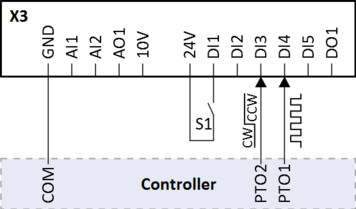
Connection plan
|
Function
|
|
|
|
Switch S1
|
Run
|
|
PTO1
|
Pulse train output of the controller
|
|
|
PTO2
|
Specification of direction of rotation of the controller
|
|
|
Parameter
|
Name
|
Setting for this example
|
|
Enable inverter
|
Constant TRUE [1]
|
|
|
Run
|
Digital input 1 [11]
|
|
|
Settings for digital inputs: Input function
|
Pulse train/direction [3]
|
|
|
Frequency control: Default setpoint source
|
HTL input [4]
|
|
|
HTL input settings
|
||
|
Minimum frequency
|
-85000.0 Hz
|
|
|
Maximum frequency
|
85000.0 Hz
|
|
|
Minimum motor frequency
|
-50.0 Hz
|
|
|
Maximum motor frequency
|
50.0 Hz
|
|
|
HTL input monitoring
|
||
|
IN1 Minimal frequency threshold
|
10000.0 Hz
|
|
|
IN1 Minimum delay threshold
|
2.0 s
|
|
|
IN 1Monitoring conditions
|
Below minimum frequency [1]
|
|
|
IN1 Error response
|
Warning
|
|
|
The status signals can be assigned to digital outputs.
 Configure digital outputs Configure digital outputs |
|
|
|
|
|
□
|
If the inverter is enabled and no error is active, the motor can be started with the "Run" function.
The motor follows the pulse train according to the set input and setting range.
|
|
□
|
The "counter-clockwise (CCW)" direction of rotation is requested externally (controller; PTO2) via digital input DI3.
|
|
□
|
If the pulse train signal falls below the input frequency of 10 kHz, for longer than 2 s, a warning is output.
|
|
□
|
If "Run" is set to FALSE, the motor is stopped with the stop method set in 0x2838:003 (P203.03). In the example: Stop with standard ramp.
|