Flexible I/O configuration
Use parameters 0x2631:xx (P400.xx) to individually adapt the inverter control to the respective application.
This is basically effected by assigning digital control sources ("triggers") to functions of the inverter.
NOTICE
A digital signal source can be assigned to several functions.
Possible consequences: Unforeseeable behaviour of the drive in case of incorrect assignment
▶
Carry out assignment of a digital signal source to several functions with greater care.
Details
–
The flexible I/O configuration is active if the selection "Flexible I/O configuration [0]" (default) is set in 0x2824 (P200.00).
–
Each subcode of 0x2631 (P400) is permanently assigned to a specific function. Functions are for example "Enable inverter", "Activate quick stop" or "Start forward (CW)".
–
For a function, exactly one (digital) trigger can be set:

–
Possible triggers to be selected are for example the digital input and internal status signals of the inverter.
–
A list of all available triggers can be found in the "Trigger list".
–
The corresponding function is executed if the trigger condition is fulfilled.
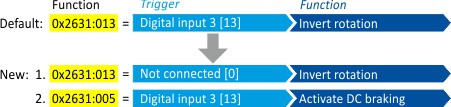
Example: changing the function assignment of a digital input
Task for this example:
1.
The preset assignment of the digital input 3 for the function "Reverse rotational direction" is to be cancelled.
2.
Instead, the digital input 3 is to be assigned to the "Activate DC braking" function.
For this purpose, the following two settings are required:
For this purpose, the following two settings are required:
 Flexible I/O configuration of the start, stop and rotating direction commands