Controller.PLCDesigner.Files
With the PLC Designer tool it is possible to access dedicated files on the Controller, the SD Card and the USB stick, after user authentication.
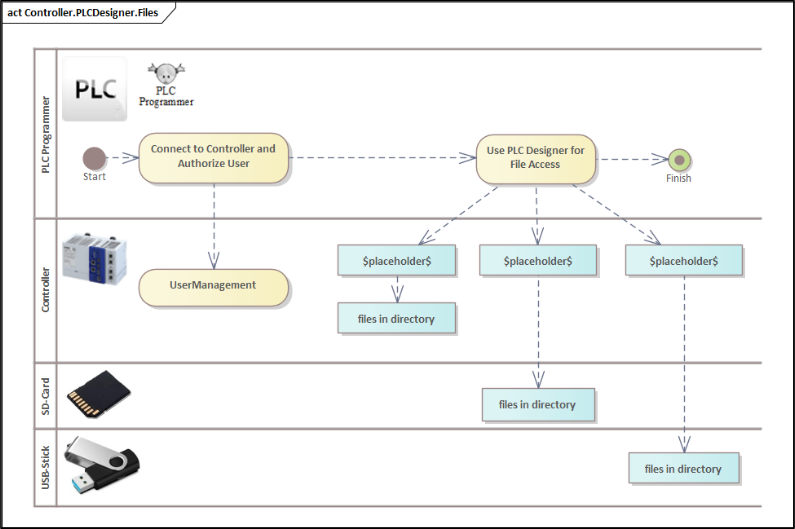
PLC Designer File Access - Activity Diagram
To use this, the following procedure must be carried out:
-
Connect the PLC Designer Tool with the Controller
-
Authentification of User and Log in
-
Use the tab Files in the PLC Designer for access the authorized files.
The following locations are offered as storage options:
| Placeholder | Location | Persistent | Device Replacement |
Description |
|---|---|---|---|---|
| $ProfileData$ | Controller | yes | yes | Cam or other profile data for Motion and FAST, which can also be added or modified dynamically. |
| $MovePathData$ | Controller | yes | yes | CNC data for Motion and FAST, which can also be added or modified dynamically. |
| $OpcUaData$ | Controller | yes | yes | OPC UA Pub Sub configuration data that is dynamically added or modified, for example, by UA Expert or other third-party OPC UA Clients. |
| $MMC$ | Controller | yes | yes | Configuration Data for Modular Maschine Concept (MMC). |
| $Recipes$ | Controller | yes | yes | Recipes Definition for Variables in CODESYS Runtime. |
| $UserDataSdCard$ | SD-Card | yes | *1) |
/userData-Directory for customer files (e.g., recipes and other persistent configurations) that the user wishes to store. This directory also contains FAST logging and diagnostic data, such as application event errors, in .csv files. |
| $UsbStorage$ | USB | yes | *2) | Directory for customer files that the user wishes to store. The USB interface must first be enabled via 0x5902 so that the USB flash drive can be mounted. |
| $ModuleHandlerTemp$ | Controller | no | no |
This directory contains an XML file (read-only) for diagnostic purposes. The file specifies the parent-child relationships in the PLC program as a function hierarchy. This hierarchy is generated at boot time and updated during runtime whenever changes occur. |
| $LicenseManagerTemp$ | Controller | no | no |
This directory contains an XML file (read-only) for diagnostic purposes. The file lists the components and the required application credits. |
| $ErrorManagementTemp$ | Controller | no | no | This directory contains all relevant data for the internal application logging (LEM - Lenze Error Manager). For example, this directory contains exportable files for EASY Starter, event texts for all components exported from PLC Designer, and much more related to LEM and error message texts. |
| $CompDirectoryTemp$ | Controller | no | no | This directory contains all the data from the Component Directory (refer to chapter Controller.ComponentDirectory). |
| $UserDataTemp$ | Controller | no | no | The customer can store temporary files (e.g., traces) in this directory. OPC UA logging and diagnostic data are also stored here. |
| $SysLogTemp$ | Controller | no | no | The authorized user can copy the internally stored SysLog files to a temporary directory by executing device command 0x2022:051, and then manually retrieve and analyze them (refer to chapter Controller.SysLog). |
| $Trace$ | Controller | yes | yes | Directory for storing CoDeSys Traces. |
| $FastUiTemps$ | Controller | no | no | Logfiles generated from EASY UI Designer and EASY UI Runtime. |
| $visu$ | Controller | |||
| $cert$ | Controller |
*1) The Controller’s application data is stored internally and also saved in encrypted form on the SD Card. These encrypted files on the SD Card enable device replacement. The data contained in this directory is not part of the encrypted data on the SD Card; rather, it is stored in plain text alongside it. As such, it is available again during device replacement but is not protected in terms of security—neither in terms of confidentiality nor integrity nor signed.
*2) The Controller’s application data is stored internally and also saved in encrypted form on the SD Card. These encrypted files on the SD Card enable device replacement. The data contained in this directory is not part of the encrypted data on the SD Card; rather, it is stored in plain text on the USB Device. As such, it is available again during device replacement (as long as the USB flash drive is transferred to the new controller) but is not protected in terms of security—neither in terms of confidentiality nor integrity nor signed.
-
The application programmer can use PLC Designer to specify the storage location for certain files. The Recipe Manager serves as an example here. The corresponding placeholder is entered as the file path. This ensures that the controller implements a “secure-by-default” approach. The programmer has the option to move the file path to another, non-secure location (e.g., the SD card). This change must be made deliberately by the customer as part of their risk assessment.