Controller.ResetToFactoryDefault
From the first versions on, the Controller had two options using the reset button in the front.
Restart
-
Content: This action reboots the controller (warm start) as an alternative to power switching.
-
Activation: Press and hold the reset button for approx. 1 second
-
Display: LEDs are off. After restart, the "RUN" LED lights up green or green/yellow.
Software Reset
-
Content: The Controller firmware is reinstalled.
-
Activation: Switch off the controller. Press and hold the reset button. Switch on the controller. Press and hold the button for approx. 15 seconds.
-
Software reset is executed. LEDs will change during execution. Please do not power off during this process until "RUN" LED lights up yellow and "RDY" LED is flashing.
-
Display: After restart, the "RUN" LED lights up green or green/yellow.
In the Firmware version 2.0.0 the Software Reset will be extended to a Reset to Factory Default (secure reset).
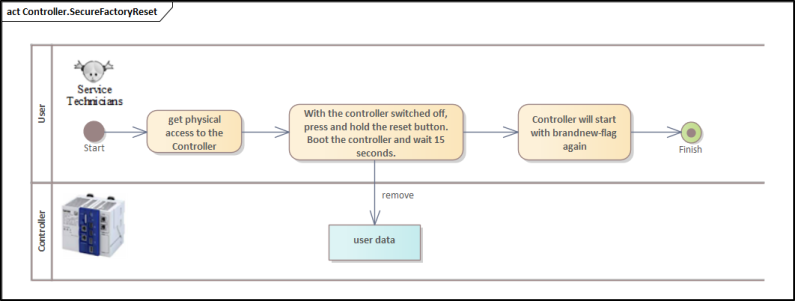
Activity Diagram of Secure Factory Reset
The activation and display behavior remain the same. But the content of the reset-command will change:
-
Firmware is reinstalled.
-
Delete all application data (e.g. the PLC program) in the Controller.
-
Delete the WebVisu projects (refer to chapter Controller.WebVisu.Activation) incl. the User Management data (refer to chapter Controller.WebVisu.UserManagement) for the extended version.
-
Delete all parameter sets in the Controller.
-
Delete the UI Designer Web-Visu projects in the Controller.
-
Delete the User Management (refer to chapter Controller.UserManagement) in the Controller.
-
Delete all certificates (refer to chapters Controller.CertificateStore.HAProxy.Certificate, Controller.CertificateStore.SysLogProxy.Certificate, Controller.EncryptedCommunication.PLCDesigner.Certificate, Controller.OPCUAServer.Certificate, Controller.OPCUAClient.Certificate).
-
After restarting, the factory default LED flashes and the USB stick can be mounted (refer to chapter Controller.USBInterface.
The activation will not delete the Application Credit from the SD Card.
This behavior is implemented temporarily in order to be able to set the controller to factory reset. In future versions, the behavior will be changed from activation via a button to a device command. The future behavior serves to further increase security against accidental Secure Factory Reset. The following behavior is therefore not yet implemented, but serves to enable your own processes to do so when the behavior is changed in the future.
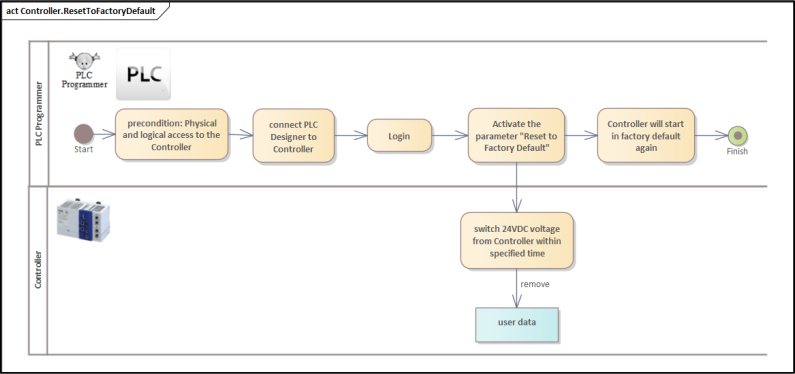
Activity Diagram of Secure Factory Reset in the Future
With the new behavior, three conditions will be necessary:
-
(Permission) User must authenticate and therefore have the right to change the device.
-
(Command) User must trigger the Reset to Factory Default device command.
-
(Presence) User must be on site and have physical access to the controller and switch the voltage in the specified time.
Leaving the "Factory Default" state
The controller leaves the "Factory Default" state when one of the following actions is performed:
an SPS boot project is created on the controller,
a firmware update is performed using the FW Loader, or
a firmware update is performed via the SD card as part of a device replacement.
After the "Factory Default" state has been left, the corresponding mechanisms that are restricted to this state are no longer available. To return the controller to the "Factory Default" state, the Reset to Factory Default procedure described above must be performed.