Controller.WebVisu.Activation
The Controller.WebVisu is only available with the extended controller variants and from the firmware version 1.8.0.11.
-
Be sure to use a target device in the PLC Designer with the name of the controller and the added note “Extended for customer specific devices only”.
The identification of these products can be done in two ways:
* The product ID is CxxxxxxxxxBxxxxxxx or CxxxxxxxxxCxxxxxxx.
* The parameter 0x2012:008 ends with 0x....C01.) The „1“ in the penultimate position shows the extended controller variante including the WebVisu.
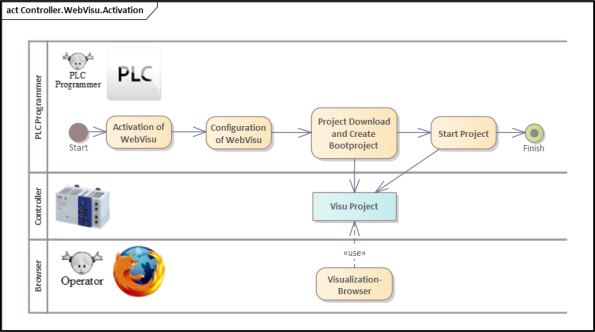
Activity Diagram
To activate WebVisu, please follow these steps:
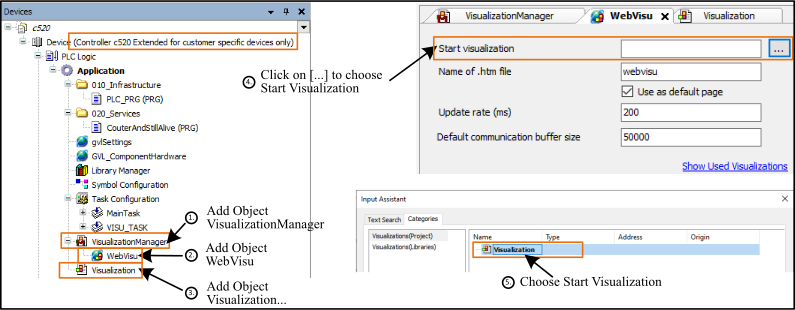
Activation of the WebVisu in the PLC Designer
1. After adding a controller device with the extension "Extended for customer-specific devices only," add an object called "VisualizationManager" as a child of the application. During this
procedure, activate the "VisuSymbols (System)" symbol library.
2. Add an object called "WebVisu" as a child of the "VisualizationManager."
3. Add an object "Visualization..." as a child of the application.
4. Open the tab for WebVisu and start the input assistant for the start visualization by clicking the [...] button.
5. Choose the Start Visualization.
Select Start Visualization.Afterwards, build and download the project to the controller. Finish by creating the boot application.
The visualization can be shown in a browser of a panel when connecting to the IP address, the port 8080 and the name of the htm file (shown in the WebVisu-Tab), e.g.:
http://192.168.10.102:8080/webvisu.htm