Controller.Application.Encryption
This functionality has been available since controller firmware version 01.11.00.
With the help of this function, the application of the controller can be encrypted. These include:
-
the application itself
-
the online change
-
the boot application.
The system integrator can use this functionality to protect its intellectual property and thus the application's source code.
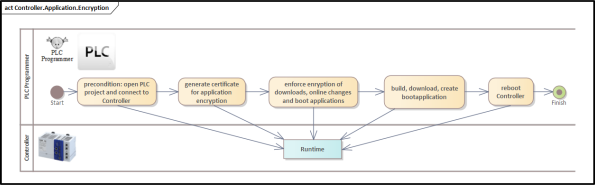
Activity Diagram
In order to use this functionality, a certificate for the application encryption is generated. This is done as shown in the following image.
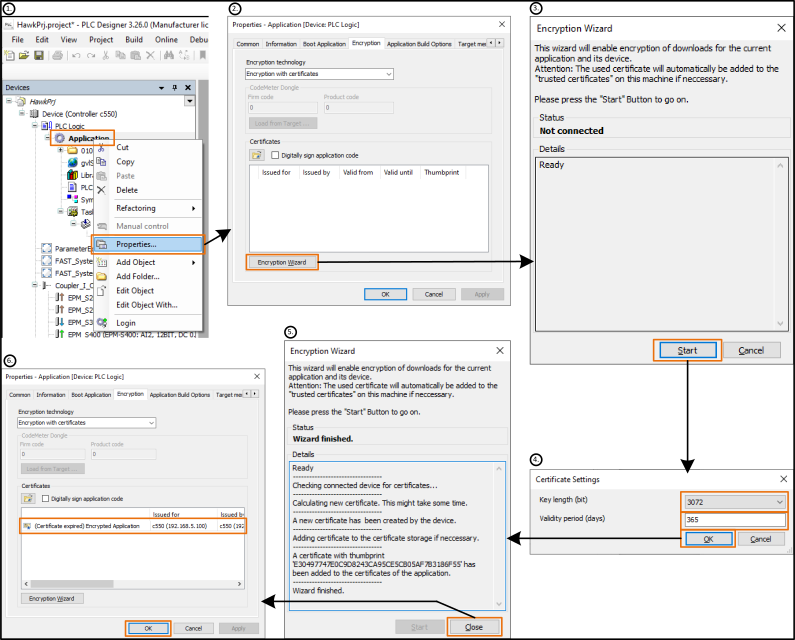
Encryption Wizzard
In order to generate a certificate for the encrypted application, the following steps must be carried out:
-
Open the »PLC Designer« project and select the Application itemin the Devices Tree and call up the "Properties..." entry.
-
Call the Encryption Wizard in the following dialog. Please choose the encryption technology "Encryption with certificates".
-
Start the Encryption Wizard.
-
Enter the key length and the validity of the certificate term and confirm with OK.
-
Information about the generated certificate is shown. The thumbprint of the certificate is shown to identify the certificate.
-
The generated certificate appears in the origination window and is now available.
To enforce the encryption of the application, select the setting "Enforce encryption of downloads, online changes and boot applications" in the »PLC Designer« in the Security Screen.
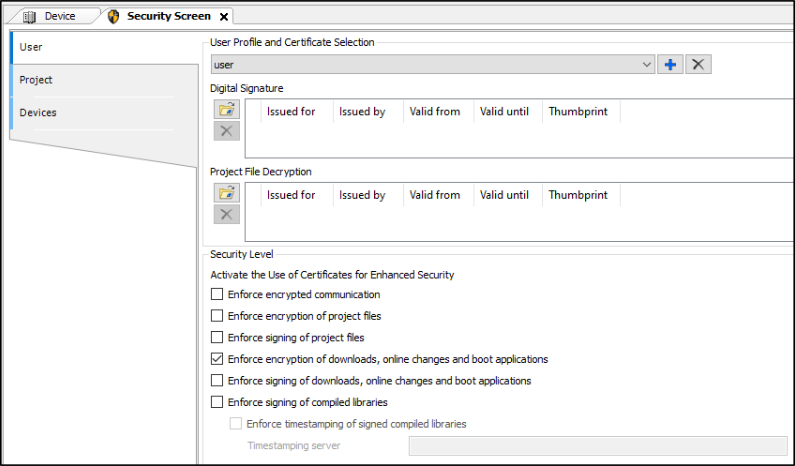
Enforce encryption of Application
The generated certificate for the Encrypted Application can be found in the Security Screen in the Devices tab. As long as the certificate is not generated, a placeholder labeled "Encrypted Application (not available)" is displayed here.

Certificate for Encrypted Application
At this point, the functions are also available to renew the certificate or load it onto the PC (Controller.CertificateStore.viaPLCDesigner).
In addition, the certificate is also displayed in the Security Screen under Project.
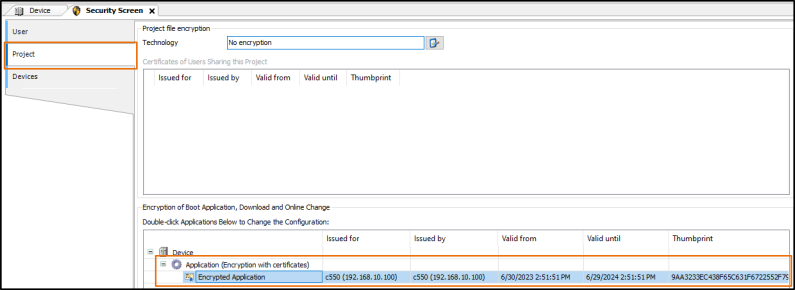
Security Screen Project
After seting up the certificate for the Encrypted Application and Enforce encryption of downloads, online changes and boot applications, the following steps must be completed:
-
Use the »PLC Designer« to rebuild the project.
-
Write the application to the controller.
-
Create boot application.
-
Restart the controller.
-
Please note that the entire application is not encrypted, only the application.app, i.e. the application program. Additional data such as
-
Retain Variables
-
Trace Data
-
EtherCAT Master Configuration Files
-
Parameter Sets of the Devices
-
CAM Data
-
Firmware Files of Devices located on the EtherCAT (e.g. i7x0)
-
OPC UA Nodeset Files
and much more are not included and are unencrypted at the destination.
-
Use Case: Controller.Application.Encryption with deleted certificate "Encrypted Application"
The controller's behavior is described below when an encrypted application is stored as a boot project and the certificate is deleted.
Pre-Condition
The Controller.Encrypted.Application with a Certificate is activated and downloaded, and a boot application is available on the Controller. After restarting the controller the boot application is running.
Delete the Own Certificate "Encypted Application" on the Controller
The next step is to is manually delete the "Encrypted Application" on the controller certificate, e.g. via the »PLC Designer«. After deleting the certificate, the application on the controller is still running.
Behavior of the application after different reset levels:
|
Reset Level |
Behavior |
|---|---|
|
Manually stop the application |
After stopping the application, the application can be started. |
|
Reset Warm |
After "Reset Warm", the application can be started. |
|
Reset Cold |
After "Reset Cold", the application can be started. |
|
Reset Origin |
After "Reset Origin", the application can not be started again. |
|
Boot of the Controller |
After "Boot of the Controller", the application can not be started again. |
If the »PLC Designer« is still logged in to the controller, the certificate for Encrypted Application in the "Security ScreenWDevices" is shown as deleted, e.g. with the placeholder "Encrypted Application (not available)" (see (1.) in the following figure). Under "Security ScreenWProject", the certificate for the Encryption of the Application is still shown, because the controller application still needs this certificate (see (2.) in the following figure).
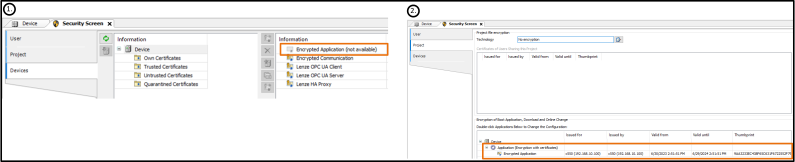
Certificate Encrypted Application Deleted
-
If the certificate is deleted and the user wants to go online on the Controller with the »PLC Designer«, this is not possible. Online changes or creating a boot application are also not possible. The deletion takes effect immediately.
Replace the Own Certificate "Encypted Application" on the Controller
After "Log Off Current Device User" and "Login" again, the message "The application does not exist" appears (see (1.) in the following figure).
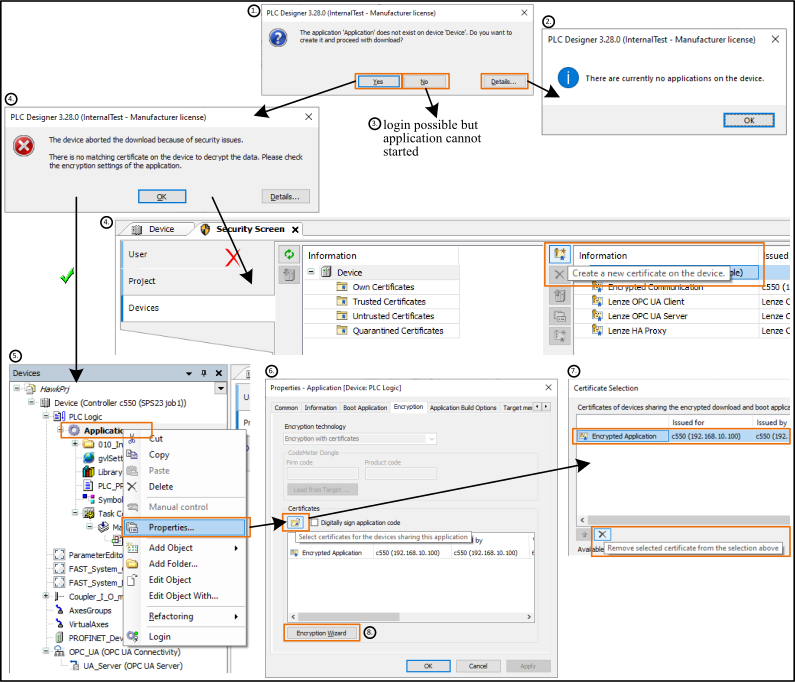
Certificae Encrypted Application Renew
The existing application cannot be downloaded to the controller, because there is no matching certificate available on the controller. To solve this problem, please do not generate a new certificate with the Security Screen on the Device for the Encrypted Application, because the certificate will not match the required certificate for the application.
To solve this problem, open the properties of the application again, delete the existing certificate and generate a new one with the Encryption Wizzard. After completing these steps, build and download the application, generate the boot application, and restart the controller The application will then run again.
Use Case: Controller.Application.Encryption with non valid certificate "Encrypted Application"
The behavior of an expired Application Encryption Certificate is the same as that of a deleted certificate: the application can no longer be started at "Reset Origin" or "Device Boot". The certificate has to be renewed, as previously described.
-
If the certificate has expired and the user wants to go online on the Controller with the »PLC Designer«, this is possible. Online changes and creating boot applications are also possible. However, after the controller has booted it will no longer be possible to start the application, make an online change or create a boot application.
Use Case: Controller.Application.Encryption in focus of Device Replacement
The behavior of the controller is described below when an Encrypted Application is stored as a boot project and the controller must be replaced.
Pre-Condition
The Controller.Encrypted.Application with a certificate is activated and downloaded, and a boot application is available on the controller. After restarting the controller the boot application is running.
Replacement of the controller
If the controller has to be replaced due to a defect, the SD card is removed and the controller hardware is replaced. After replacing the controller, however, the application does not start. The reason for this is the necessary but missing certificate. A controller exchange is therefore not possible without the previously described certificate renewal process and a new build, download application, creation of a boot project and restart of the controller.
Use Case: Controller.Application.Encryption in focus of Backup and Restore
The behavior of the controller is described when a backup is restored to a changed controller.
Precondition
The Controller.Encrypted.Application with a certificate is activated and downloaded, and a boot application is available on the controller. After restarting the Controller the boot application is running.
Backup
With the help of the backup mechanism, the runtime system (firmware) and the project data on the SD card are copied to the plugged USB stick. Refer to parameter 0x2022:040.
Changing the Controller Application
In this step, the application of the controller is changed. This is to indicate a further development in the life cycle of the PLC project.
Restore
After the change, the original state should be restored. With the help of the restore mechanism, the runtime system (firmware) and project data on the SD card are copied from the plugged USB stick. Refer to parameter 0x2022:043.
Depending on the condition, the behavior may differ.
-
If the application encryption certificate was not changed when the application, was changed the restored application starts again without any problems and the restore process can be completed successfully.
-
If the application encryption certificate was changed when the application was changed, the restored application will not start. This is due to a mismatch between the required restored application certificate and the actually existing certificate on the controller.
Use Case: Controller.Application.Encryption in focus of Series Commissioning using the Backup and Restore Mechanism
The Backup and Restore tool saves the data of the firmware and the application on the USB stick. However, for security reasons, the private keys and certificates are not saved. For this reason, series commissioning cannot be used with this mechanism, since the pair of keys does not exist on the target system. With activated Application Encryption, series commissioning must therefore be carried out via the »PLC Designer«.
Use Case: Controller.Application.Encryption in focus of Application Loader
-
The "create boot application" offline function from the »PLC Designer« does not work with the Controller.Application.Encryption. Therefore, an *.lda cannot be created this way.
Use Case: Handling one project with Controller.Application.Encryption for more Controller
This use case describes the behavior of a »PLC Designer« project intended for multiple controllers. The process is shown in the following figure.
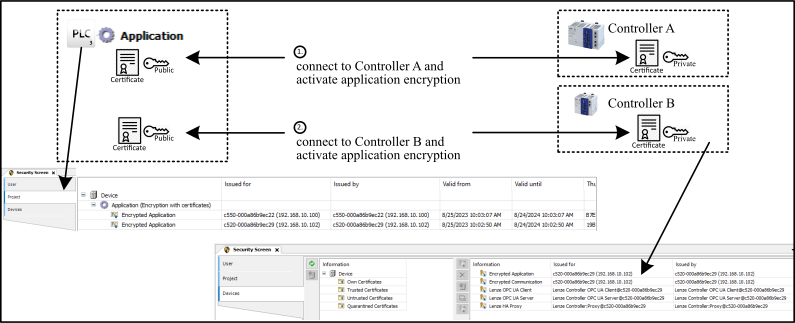
Project for multible controllers
-
Connect the »PLC Designer« to controller A and activate the application encryption using the Encryption Wizard of the application.
-
Controller A will create a certificate including the private key, which will be available in the Certificate Store of controller A as "Encrypted Application" certificate.
-
At the same time the PLC project will include certificate A including the public key, which will be available in the application for the PLC project.
-
Connect the »PLC Designer« to controller B and activate the application encryption using the Encryption Wizard of the application.
-
The controller B will create a certificate including the private key, which will be available in the Certificate Store of Controller B as‚"Encrypted Application" certificate.
-
At the same time, the PLC project will include certificate B including the public key, which will be available in the application for the PLC project.
-
Ultimately the application for the PLC project will include both certificates. Depending on the active application, the corresponding certificate is then used for encryption.