Controller.OPCUAServer.Certificate
The OPC-UA Server offers the following message security modes:
-
None
Does not include security mechanisms and should only be used for testing purposes and therefore not for productive operation.
-
Sign
Includes security mechanisms to ensure integrity.
-
Sign & Encrypt
Includes security mechanisms to ensure integrity and confidentiality.
If the selection "Sign" or "Sign & Encrypt" is selected here, certificate handling is required. This can be set on the server side as follows.
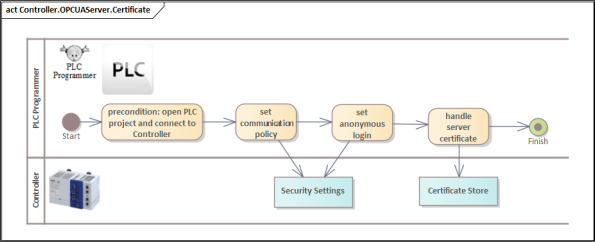
Activity Diagram
When the controller is started for the first time, a separate certificate is created for the OPC-UA Server. This can be seen in the Security Screen under Devices in the "Own Certificates" section.

Own Certificate
The certificate automatically created here is a self-signed certificate with a term of 50 years. If the runtime is to be reduced for security reasons, the certificate can be replaced using the function "Create a new certificate on the device" (Controller.CertificateStore.viaPLCDesigner).
When an OPC-UA Client connects to the OPC-UA Server, the respective own certificates are exchanged. With the OPC-UA Server, the received client certificate will then be found under "Quarantied Certificates".
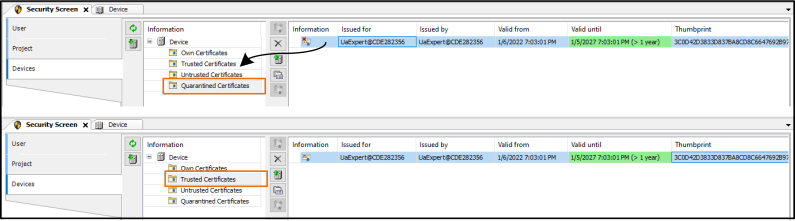
Handling Client Certificates
This must then be moved from quarantine to the "Trusted Certificates" section. For this purpose, the »PLC Designer« can be used as shown (Controller.CertificateStore.viaPLCDesigner) or the diagnostic visualization (Controller.CertificateStore.viaAdvancedVisu). Once it has been moved to the trusted area, the connection between client and server can be established.