Prepare Controller 1 (SKS Server)
-
Set Controller Parameters
-
Activate PubSub as it is described in 2.2 Configuration and Diagnosis
-
Set controller local time in 0x245C:002 (manually or via NTP).
-
The controller OPC UA Server time has to be equal (or at least a little bit in future) to the GDS system time!
-
Set the controller Endpoint IP parameter 0x2471:135 = Bit 1 IP-Engineering.
This parameter ensures that the Endpoint URL of the OPC UA Server will be IP based instead of hostname based (will be applied after controller restart) If the Endpoint IP parameter is set to IP-Engineering, the IP address is additional taken over to the certificate alternative name automatically. The IP addresses will be applied only by certificate re-creation. See step 3.
-
Create boot application to save the parameter set.
-
-
Delete old Lenze OPC UA Server Certificate in the own Certificate folder and reboot Controller to create new Server Certificate. This enforces the controller to recreate all missing certificates new.

-
Optional: check Server Endpoint URL and Certificate
-
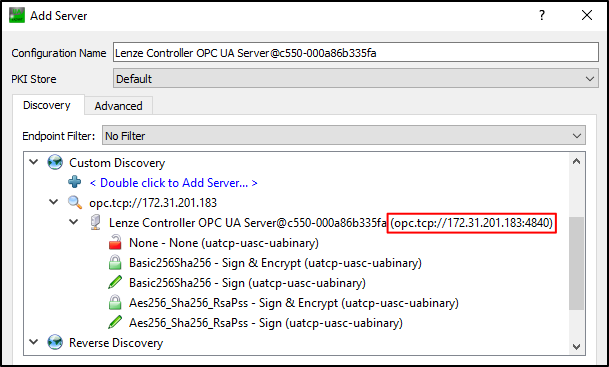
Check Lenze OPC UA Server Endpoint URL with UA Expert
In the Discovery the IP-Adress should be visible in the parentheses (instead of the hostname)
-
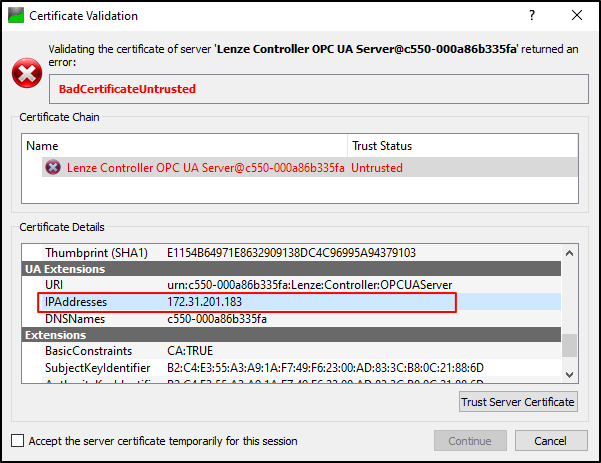
Connect with UA Expert and check the certificate. The IP address should be visible in the UA Extensions.
-