-
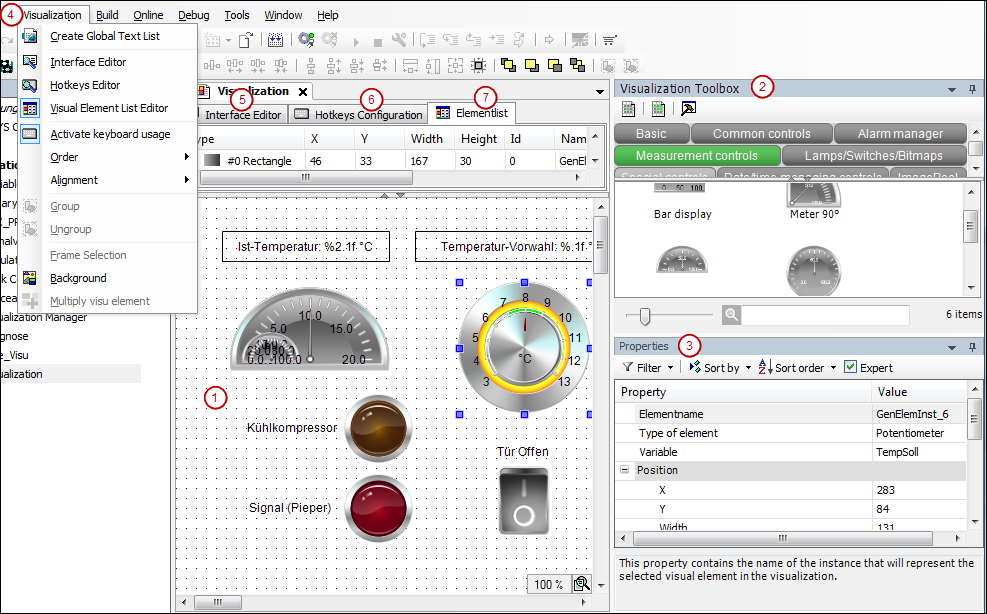
Visualization editor: Here you create and edit your visualization from visualization elements.
-
Visualization ToolBox view: Provides the installed visualization elements
-
Properties view: For the configuration of a visualization element selected in the editor area
-
Visualization menu: Commands for working in the visualization editor
-
Interface editor: In this editor, you declare the interface of a visualization page which is referenced by the frame element (or tab element) of a superordinate visualization. You declare parameters (interface variables) which are specified by the calling visualization instance.
-
Hotkeys Configuration: Definition of shortcuts for user input on the visualization in online mode
-
Element list: List of all elements which are used in the visualization with the possibility of editing their position on the Z-axis