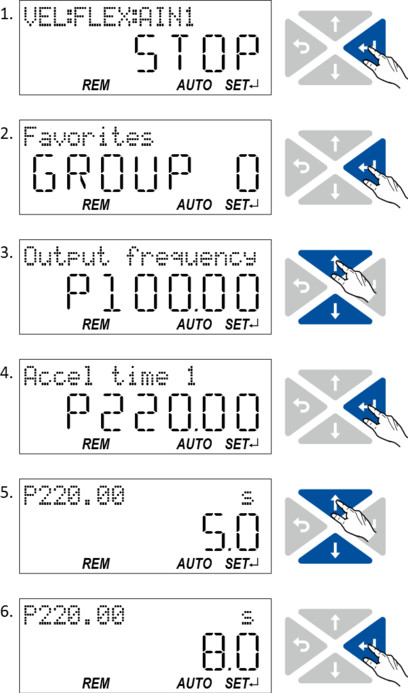
Accessing the "Favorites" with the keypad
|
|
1.
Use the key in the operating mode to navigate to the parameterisation mode one level below.
You are now in the group level. All parameters of the inverter are divided into different groups according to their function. Group 0 contains the "Favorites". Note: By using the key you can navigate one level upwards again anytime. 2.
Use the key to navigate to one level below.
You are now in the parameter level of the group selected. 3.
Use the and navigation keys to select the desired parameter.
4.
Use the key to navigate to one level below.
You are now in the editing mode. 5.
Set the desired value using the and navigation keys.
6.
Use the key to accept the changed setting.
The editing mode is exited. Note: By using the key you can exit the editing mode without accepting the new setting (abort). |
 key in the operating mode to navigate to the parameterisation mode one level below.
 key you can navigate one level upwards again anytime.
 and
 navigation keys to select the desired parameter.