Acknowledgement with confirmation button S82
If the device detects a modified parameter set or a changed safety address during initialization, for example, the device requests an acknowledgement with confirmation button S82.
Confirmation is also required after a firmware update (e.g., after a device replacement) to activate the newly installed safety-related software component.
|
LED "RDY" (yellow)
|
LED "ERR" (red)
|
Status
|
Meaning
|
|
on
|
off
|
Restart acknowledgment requested
|
The device is working correctly.
|
|
flashes (2 Hz)
|
During startup, a modified parameter set was detected in the "Init" state.
|
||
|
flashes (4 Hz)
|
During startup, a changed safety address was detected in the "Init" state.
|
||
|
The detection of a firmware update is indicated by the subsequent flashing of the safety LEDs.
|
|||
|
on
|
1 second, increasing
|
Software confirmation requested
|
During startup, a modified safety-related software component (-or- was detected.
|





All requests are acknowledged with the same steps.
The acknowledgement procedure is aborted if the reaction time of 2.5 seconds is exceeded. The acknowledgement procedure must be repeated.
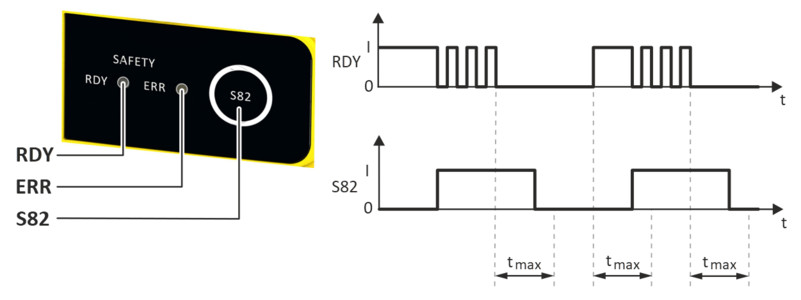
Fig. 1: Sequence of the acknowledgement procedure
RDY
LED "RDY"
S82
Confirmation button S82
t
Time axis
tmax
Maximum permissible response time
To acknowledge the request with the S82 confirmation button:
Precondition:
✓
The "RDY" LED is lit.
✓
The "ERR" LED is blinking.
1.
Press and hold the S82 button.
The "RDY" LED starts blinking.
2.
The "RDY" LED goes off after 3 seconds.
3.
Release the S82 button after a maximum of 2.5 seconds.
The "RDY" LED is lit.
4.
Press and hold the S82 button after a maximum of 2.5 seconds.
The "RDY" LED starts blinking.
5.
The "RDY" LED goes off after 3 seconds.
6.
Release the S82 button after a maximum of 2.5 seconds.
The acknowledgement is successfully completed.
The action is recorded in the inverter logbook.
7.
Use a function test to ensure that the acknowledgement has led to the correct result.
If the parameter set is invalid, an error is reported and the "ERR" LED starts blinking.