Baud rate setting
All network nodes must be set to the same baud rate.
Details
–
The baud rate can be optionally set in 0x2301:002 (P510.02) or using the DIP switches on the device labelled with "a" ... "d" (see the following table).
–
The setting that is active when the inverter is switched on is the effective setting.
–
The active baud rate is displayed in 0x2302:002 (P511.02).
View of the DIP switch
|
|
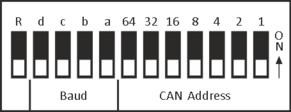
|
d
|
c
|
b
|
a
|
Baud rate
|
|
OFF
|
ON
|
OFF
|
ON
|
20 kbps
|
|
OFF
|
OFF
|
ON
|
ON
|
50 kbps
|
|
OFF
|
OFF
|
ON
|
OFF
|
125 kbps
|
|
OFF
|
OFF
|
OFF
|
ON
|
250 kbps
|
|
OFF
|
OFF
|
OFF
|
OFF
|
500 kbps
|
|
OFF
|
ON
|
OFF
|
OFF
|
1 Mbps
|
|
When a combination is set that is not in the list, the baud rate is set to 500 kbps.
|
||||
Parameter