Save parameter settings with »EASY Starter«
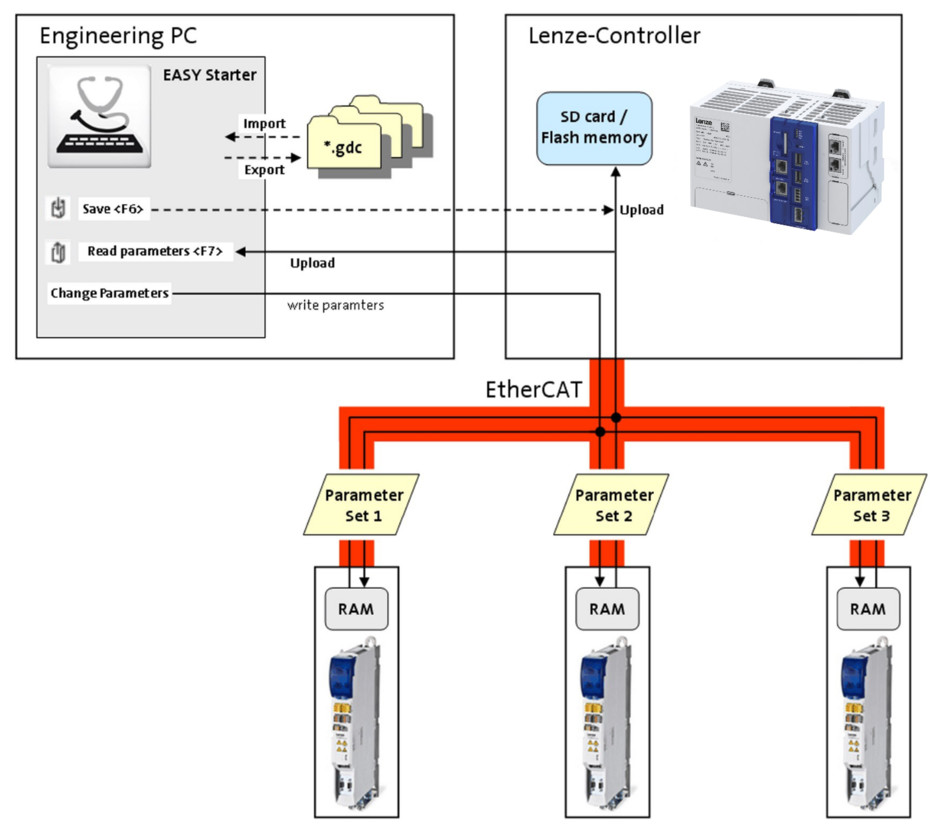
Fig. 1: Parameter management with the »EASY Starter«
Saving parameters on the engineering PC
How to save the parameter settings on the engineering PC
✓
The Lenze controller and the inverters must be inserted in the device list.
1.
Select an inverter in the device list.
2.
Press the button or the <F7> function key.
 button or the <F7> function key.
The parameter settings of the inverter are transferred to the "EASY Starter".
The parameter settings of the inverter are not stored in the Lenze controller.
3.
Use the "Save" button to save the parameters as a GDC file on the Engineering PC.
Saving parameters persistently in the Lenze controller
How to save the parameter settings persistently in the Lenze controller
✓
The Lenze controller and the inverters must be inserted in the device list.
1.
Select the Lenze controller in the device list.
2.
Press the button or the <F6> function key.
 button or the <F6> function key.
The parameter settings of all lower-level inverters are persistently stored in the Lenze controller.
After the system is switched off and on again, the Lenze controller automatically transfers the parameters to the lower-level inverters.