Acknowledgement with confirmation button S82

All requests are acknowledged with the same steps.
The acknowledgement procedure is aborted if the reaction time of 2.5 seconds is exceeded. The acknowledgement procedure must be repeated.
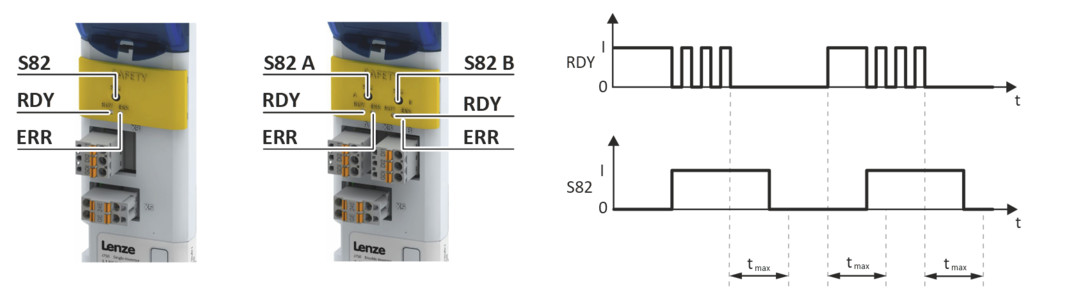
Fig. 1: Sequence of the acknowledgement procedure
RDY
LED "RDY"
S82
Confirmation button S82
t
Time axis
tmax
Maximum permissible response time
To acknowledge the request with the S82 confirmation button:
Precondition:
✓
The "RDY" LED is lit.
✓
The "ERR" LED is blinking.
1.
Press and hold the S82 button.
The "RDY" LED starts blinking.
2.
The "RDY" LED goes off after 3 seconds.
3.
Release the S82 button after a maximum of 2.5 seconds.
The "RDY" LED is lit.
4.
Press and hold the S82 button after a maximum of 2.5 seconds.
The "RDY" LED starts blinking.
5.
The "RDY" LED goes off after 3 seconds.
6.
Release the S82 button after a maximum of 2.5 seconds.
The acknowledgement is successfully completed.
The action is recorded in the inverter logbook.
7.
Use a function test to ensure that the acknowledgement has led to the correct result.
If the parameter set is invalid, an error is reported and the "ERR" LED starts blinking.