Manual "tension/frequency" test mode
Functional description

In case of devices that correspond to the "dual use regulation" (EC 428/2009), values higher than + 599 Hz up to lower than - 599 Hz do not increase the output frequency. Please observe the deadband occurring in this case.
Further information can be found in the section "Frequency and speed limitations".
After the controller is enabled in this test mode, a rotary field voltage is output at the motor terminals with the set output frequency f out.
–
If the selected frequency is positive, the motor should rotate clockwise when looking at the A side of the motor. If this is not the case, the motor phases are connected incorrectly.
–
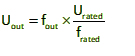
The output voltage level is determined by the following equation
|
Equation for calculating the output voltage
|
|||
|
|
|||
|
Parameter
|
Symbol
|
Description
|
Dimension unit
|
|
Vout
|
Current output voltage
|
V
|
|
|
fout
|
Output frequency for test mode
Please observe the notes in the section "Frequency and speed limitations".
|
Hz
|
|
|
Vrated
|
Base voltage
|
V
|
|
|
frated
|
Base frequency
|
Hz
|
|
The manual "voltage / frequency" test mode also serves to check the wiring of the feedback system.
–
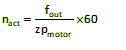
If the feedback system of a synchronous motor is set correctly, an actual speed should be displayed that can be calculated with the following equation (if the feedback system of an asynchronous motor is set correctly, the actual speed is a bit lower due to the slip):
|
Equation for calculating the actual speed
|
|||
|
|
|||
|
Parameter
|
Symbol
|
Description
|
Dimension unit
|
|
nact
|
Actual speed
|
rpm
|
|
|
fout
|
Output frequency for test mode
|
Hz
|
|
|
zpMotor
|
Number of motor pole pairs
|
|
|
Conditions for the execution
–
The motor must rotate freely.
–
The servo inverter is error-free and in the "switched-on" device state.
Response of the motor during performance
The motor moves as a function of the set output frequency.
How to activate the manual "voltage/frequency" test mode:
1.
Disable the inverter  Enable operation.
 2.
Change to the "voltage/frequency" test mode. 0x2825 = 1
0x2825 = 13.
Enable the inverter to start the test mode.
4.
To stop the test mode again: