Security mechanisms : Change from Secure-by-Default to Minimum-Security
General
From Firmware 2.0, Lenze Controllers are delivered with Secure-by-Default settings. This means that security functions are enabled by default to protect the controller against unauthorized access.
This chapter describes how to disable configurable security functions if they are not required for the intended application.
Starting with firmware version 2.0, the controller implements a secure boot process. During startup, the authenticity and integrity of the software are verified using a Lenze trust anchor and a controller-specific key.
The secure boot mechanism is permanently enabled and cannot be deactivated. Only security functions described in this chapter can be disabled.
Firewall
The Firewall is a key security feature of the Controller. It controls and protects network communication between the Controller and connected networks.
The Firewall restricts communication according to predefined security rules and blocks network traffic that is not permitted.
To disable the Firewall:
-
Start the PLC Designer
-
Open the Controller settings via "Device"
-
Navigate to Settings > Communication > Firewall
-
Deactivate the Firewall via the "Firewall activation" option.
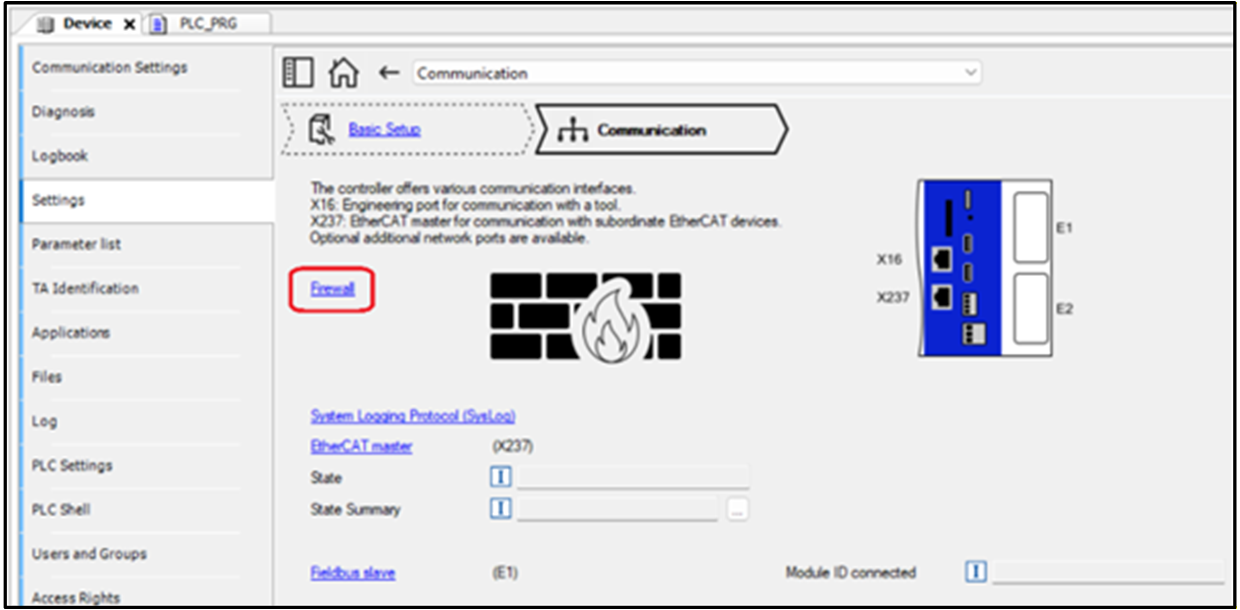
Open Firewall Dialog
Under the "Firewall" item, the firewall can be deactivated via the "Firewall activation" menu.
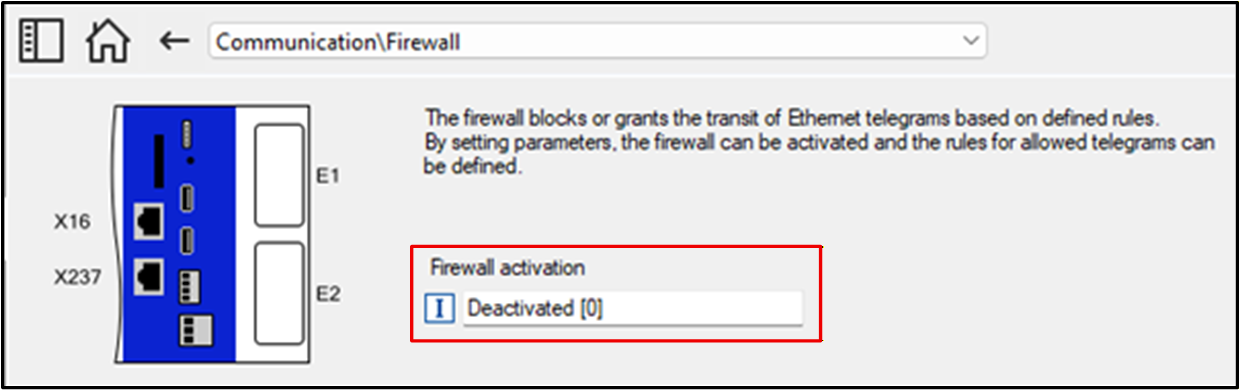
Deactivate Firewall
User Management
The User Management is used to manage user rights and roles within an automation system.
By default, User Management is enabled to control access to the controller based on user accounts, roles, and permissions.
To disable User Management:
1. Open the PLC Designer.
2. Select the controller "Device".
3. Navigate to "Communication Settings".
4. Click on Device - Change Controller Runtime Policy
5. Change to Optional User Management
6. Right click the Controller "Device" in the device tree and remove the user management via "reset origin device".
Encrypted communication
By default, the controller uses encrypted communication to protect data against unauthorized access and manipulation during transmission.
Encrypted communication can be disabled in the PLC Designer.
Open the Runtime Security Policy settings as shown in the figure below.
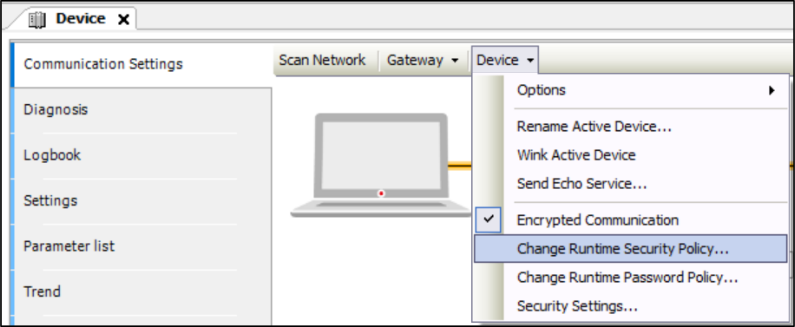
Change Runtime Security Policy
In the "Change Runtime Security Policy" dialog, the communication setting is configured as "Enforced encryption" by default. Change this setting to the required option to disable encrypted communication.
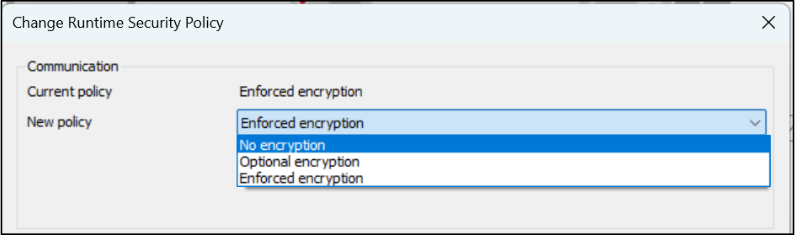
Communication Policy
Extended functions
Certain Controller functions that were available in previous firmware versions are disabled by default as part of the Secure-by-Default concept.
If required for a specific application, these functions can be re-enabled using the corresponding parameters in PLC Designer or EASY Starter.
The following table lists the available functions and the associated parameters.
|
Function |
Firewall Port(s) |
Least Functionality Parameter |
|---|---|---|
| SFTP | 31855/tcp, 47877/tcp | 0x5915:003 |
| http | 80/tcp | n.a. |
| HA Proxy and lighttpd | 80tcp, 443/tcp | 0x5915:005 |
| UI Gateway and Runtime | n.a. | 0x5915:002 |
| UI Designer Access | 7100/tcp, 7200/tcp | 0x5915:001 |
| Ethercat Diagnostic Tool Service | 6000/tcp | 0x5914:004 |
| NTP Server | 123/udp | 0x245B:003 |
Device Replacement
With the introduction of Secure-by-Default, additional security mechanisms have been implemented to protect the Controller against unauthorized modifications and access.
As a result, the procedure for replacing a device has changed.
Replacing a Controller by simply transferring the SD Card is no longer sufficient, as this approach does not provide protection against manipulation or unauthorized use.
Additional steps are required to ensure that the replacement device maintains the intended security level.
If the Lenze key is selected as secret type, the controller behaves as in firmware versions 1.x with regard to device replacement. In this configuration, a device replacement can be performed by transferring the SD card, as was possible with earlier firmware versions.
The complete Device Replacement procedure is described in the chapter Controller.DeviceReplacement.