UIDesigner.ServerManagerUI.Certificate
This functionality has been available since »EASY UI Designer« version 01.05.00 and controller firmware version 01.11.00.
If the controller forcing an encrypted communication, the Server Manager UI needs a certificate handling for encryption.
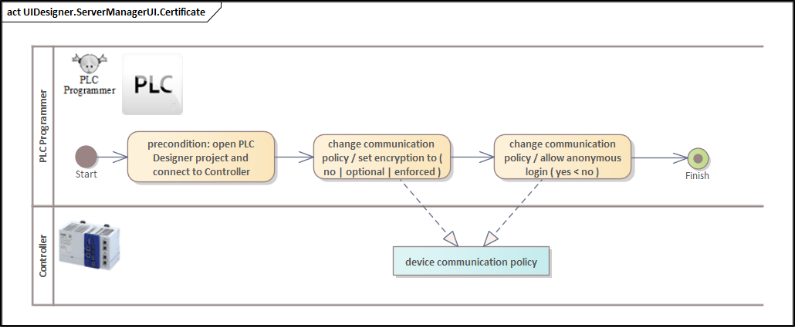
Activity Diagram
The »EASY UI Designer« can be operated with two protocols. The unencrypted TCP protocol is used via port 7100 and the encrypted TCP/SSL protocol is used via port 7200. The »EASY UI Designer« operator configure these settings via the Target Device Manager.
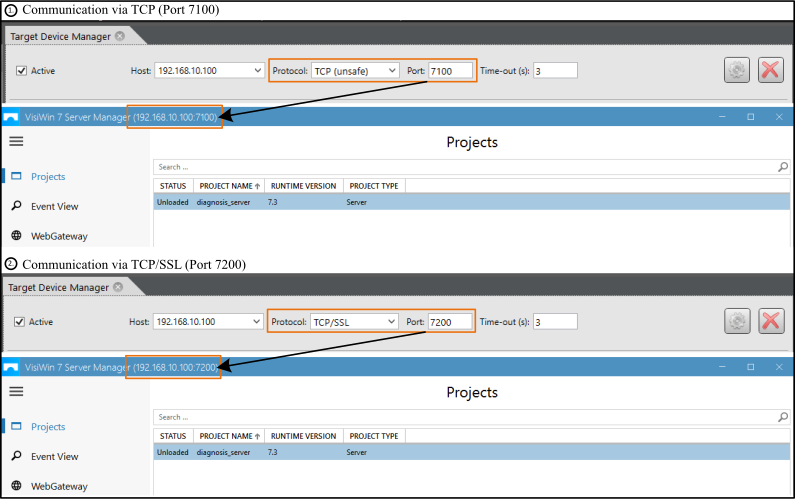
Configuration
Depending on the controller setting, a connection can be established. The combinatorics can be found in the following table.
|
EASY UI Designer |
Communication policy |
||
|---|---|---|---|
|
No encryption |
Optional encryption |
Enforced encryption |
|
|
TCP Port 7100 |
EASY UI Designer protocol must be TCP via Port 7100 |
EASY UI Designer protocol can be TCP via Port 7100 |
not possible |
|
TCP/SSL Port 7200 |
not possible |
EASY UI Designer protocol can be TCP/SSL via Port 7200 |
EASY UI Designer protocol must be TCP/SSL via Port 7200 |
If the encrypted connection is selected, a certificate is automatically generated on both ends of the connection, the »EASY UI Designer« and the Runtime on the Controller, which is used for encryption. User interaction is not necessary.