Open file
Before opening files
You can find out how to create a file from a package of Lenze device descriptions in the section:
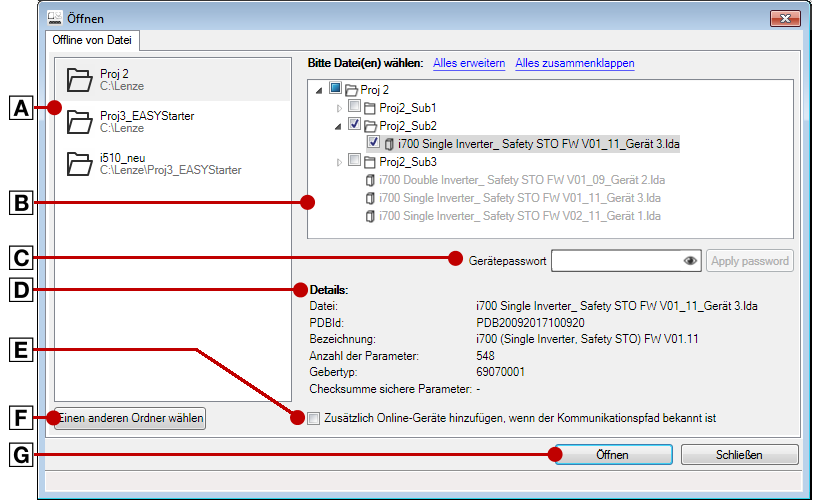
The Open dialogue allows you to transfer one or more files to the "EASY Starter" device list.
Devices that are included in the device list but do not actually exist are referred to as "offline devices".
-
In contrast to an offline device, an actual device communicates continuously with the "EASY Starter" via a connection. This device is referred to as an "online device".
The data of an offline device contained in the device list can also be downloaded to "online" devices if these are also in the device list.
An offline file is a project file that is characterised by the file type *.lda (" L enze D evice A pplication").
It contains all the data that the user creates or transfers for a device, i.e.
-
Complete parameters including the settings,
-
optionally an executable programme (depending on the device series),
-
Optional further data, e.g. safe parameters (depending on the device series).
Prerequisites
In order for the files to be opened in the "EASY Starter", they must be
-
are located on storage media that can be accessed via the "EASY Starter".
-
have the file type *.gdc or *.lda .
Dialogue for opening files
|
0 |
|
|
1 |
|
|
2 |
|
|
3 |
|
|
4 |
|
|
5 |
|
|
6 |
Open button |
To open a file as an offline device:
-
Select a directory in the project directory list.
-
Select one or more files from the list of files.
-
Press the Open button.
-
After pressing the button, the selected files are available as offline devices in the "EASY Starter" device list.
-
Related topics