Move to parking position
There are two ways to travel to the parking position:
-
The flying saw is not active.
-
The technology module is in the "READY" state.
-
A rising edge (FALSE ä TRUE) at the input xMoveToParkPos changes the state from "READY" to "MoveToParkPos" and the saw carriage is travelled to the parking position set in the parameter lrParkPosition .
-
-
The flying saw is switched to active with the input xStartFlyingSaw = TRUE. The mode eFlyingSawStopMode = 1 (move to parking position) is set.
-
If the input xStartFlyingSaw is then reset from TRUE to FALSE, the carriage moves to the parking position set in the parameter lrParkPosition.
-
During the positioning the output xPositioning = TRUE.
If the parking position is reached, the outputs xInPosition = TRUE and xPositioning = FALSE are set.
Example
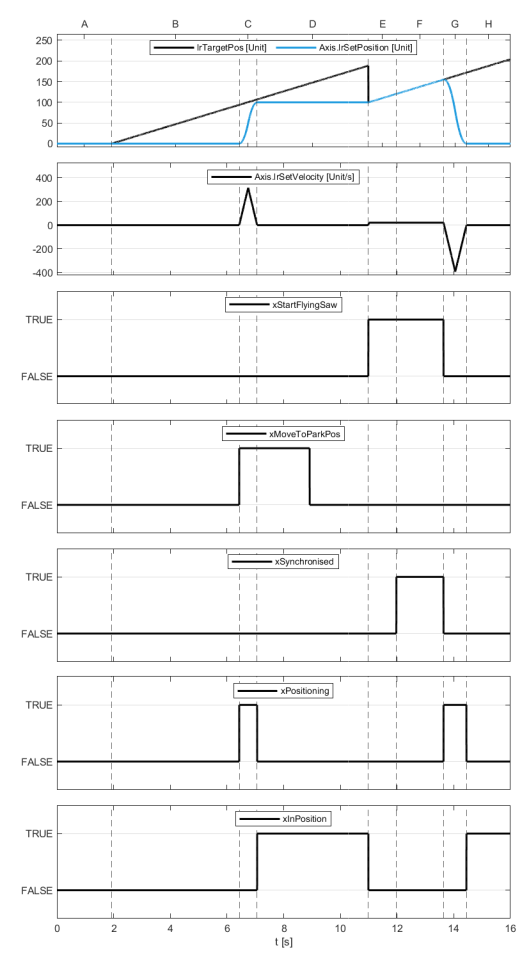
Example: Process "Move to parking position"
|
No. |
xStartFlyingSaw |
xMoveToParkPos |
Status |
Description |
|---|---|---|---|---|
|
A |
FALSE |
FALSE |
xSynchronised = FALSE xPositioning = FALSE xInPosition = FALSE |
The slave axis is at the left end position of the working area lrLowerLimit . |
|
B |
FALSE |
FALSE |
xSynchronised = FALSE xPositioning = FALSE xInPosition = FALSE |
The material is moved. The slave axis is still at the left end position of the working area lrLowerLimit . |
|
C |
FALSE |
TRUE |
xSynchronised = FALSE xPositioning = TRUE xInPosition = FALSE |
The slave axis is moved to the parking position lrParkPosition = 100. |
|
D |
FALSE |
FALSE |
xSynchronised = FALSE xPositioning = FALSE xInPosition = TRUE |
The slave axis has reached the parking position lrParkPosition = 100. |
|
E |
TRUE |
FALSE |
xSynchronised = FALSE xPositioning = FALSE xInPosition = FALSE |
The state of the technology module changes to "SAW_IN_PROCESS". The target position lrTargetPos is travelled along with the master position. The target position lrTargetPos moves into the work area. The slave axis is synchronized to the target position lrTargetPos . |
|
F |
TRUE |
FALSE |
xSynchronised = TRUE xPositioning = FALSE xInPosition = FALSE |
The slave axis is synchronized into the target position lrTargetPos . The cutting process is then performed on the material. |
|
G |
FALSE |
FALSE |
xSynchronised = FALSE xPositioning = TRUE xInPosition = FALSE |
With xStartFlyingSaw = FALSE the cutting process is terminated. With the parameter eFlyingSawStopMode = 1 (MoveToParkPos) the slave axis moves to the parking position lrParkPosition = 100. |
|
H |
FALSE |
FALSE |
xSynchronised = FALSE xPositioning = FALSE xInPosition = TRUE |
The slave axis has reached the parking position lrParkPosition = 100. |
Parameters to be set
-
eFlyingSawMode , Initial value: 0 (mark-controlled operation)
-
eFlyingSawStopMode , Initial value: 0 (Halt)
-
lrParkPosition , Initial value: 0 units
See the parameter structure L_TS2P_scPar_FlyingSawState.