Window for following error monitoring
If the parameter is activated, the xSynchronised output is only set to TRUE if the tracking error is within the parameterised limits for a defined time. The limits are permanently monitored and the xSynchronised output changes to the value FALSE if they are violated. For example, this function can be used to prevent damage to the sawing tool.
If xPosInWindow= FALSE, the xSynchronised output is set based on the setpoint..
The window and the time are set via the parameters lrPosInWindow and lrDwellTimePosInWindow in the parameter structure L_TS2P_scPar_FlyingSawState . As soon as the two reference values of the master and slave axis are synchronous and the following error is within the set window, the output xSynchronised = TRUE is set.
Example
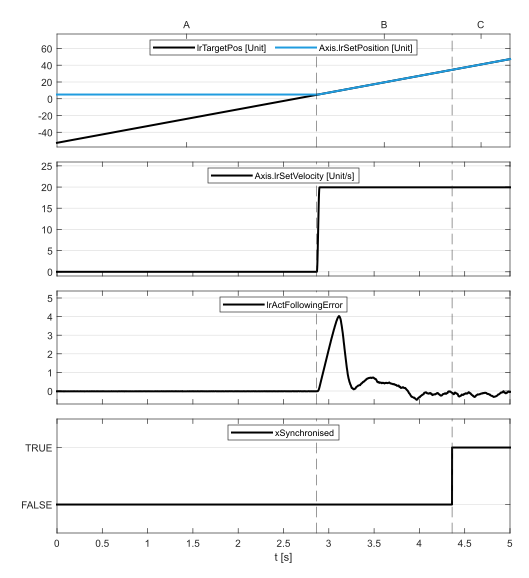
Example: Process of the following error monitoring
|
No. |
xSynchronised |
Description |
|---|---|---|
|
A |
FALSE |
The master axis, and thus the material, is moved. The technology module is in the "SAW_IN_PROCESS" state. The target position lrTargetPos moves synchronously to the material velocity below the limit lrLowerLimit . |
|
B |
FALSE |
The target position lrTargetPos enters the working range of the flying saw. This synchronizes the slave position to the target position. The saw carriage is synchronized with the mark. The following error is corrected. |
|
C |
TRUE |
The following error has remained within the parameterized window lrTolerancePosInWindow at least for the time lrDwellTimePosinWindow . This sets the output xSyncronised = TRUE. |
Parameters to be set
-
eFlyingSawMode , Initial value: 0 (mark-controlled operation)
-
xPosInWindow , Initial value: 0
-
lrTolerancePosInWindow , Initial value: 0.5 units
-
lrDwellTimePosInWindow , Initial value: 50 ms
See the parameter structure L_TS2P_scPar_FlyingSawState.