Separation of cut materials (Inserting a gap)
This function is suitable for:
-
Edge protection for sensitive material
-
Separation of the cut material
The gap prevents leaving any marks of the saw blade on the cutting edge.
The xExecuteGap input can be used to separate the cut material after the cutting process. This function shortly drives the saw carriage oversynchronous (faster) to the material before the saw blade is withdrawn. This creates a gap between the cutting edge and the saw blade, which can be adjusted via the parameter lrGap . The input can be activated several times in succession. This increases the gap by a multiple of lrGap .
Example
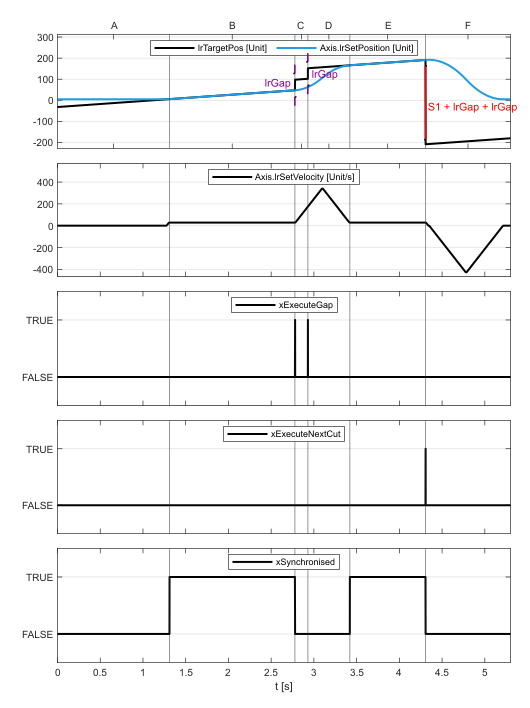
Example: Separation of cut material (inserting a gap)
|
No. |
xExecuteGap |
xExecuteNextCut |
xSynchronised |
Description |
|---|---|---|---|---|
|
A |
FALSE |
FALSE |
FALSE |
The slave axis is at the left end position lrLowerLimit of the working range. The target position lrTargetPos moves synchronously with the material velocity below the limit lrLowerLimit . |
|
B |
FALSE |
FALSE |
TRUE |
The target position lrTargetPos moves into the work area. The slave axis is coupled to the target position lrTargetPos . The cutting process is then performed on the material. |
|
C |
FALSE ä TRUE |
FALSE |
FALSE |
With the command "Execute gap" the target position lrTargetPos jumps by the gap width lrGap in the positive direction. The slave axis smoothes out the jump of the target position lrTargetPos via the profile generator with the defined parameters lrSyncVel , lrSyncAcc and lrSyncDec . |
|
D |
FALSE ä TRUE |
FALSE |
FALSE |
An additional "Execute gap" command is requested via the input xExecuteGap . The target position lrTargetPos jumps by the gap width lrGap in the positive direction. The slave axis now smoothes out the jump in the target position and also the total gap that was generated via the profile generator with the defined parameters lrSyncVel , lrSyncAcc and lrSyncDec . |
|
E |
FALSE |
FALSE |
TRUE |
After the jump is smoothed out, the slave axis continues to travel synchronously to the target position lrTargetPos . |
|
F |
FALSE |
FALSE ä TRUE |
FALSE |
With the command "Next cut" ( xExecuteNextCut ) the target position jumps by the cutting length lrCuttingLength = S1 added with the two gap widths ( lrGap + lrGap ) in the negative direction. The slave axis smoothes out the jump of the target position lrTargetPos via the profile generator with the defined parameters lrSyncVel , lrSyncAcc and lrSyncDec . |
Parameters to be set
-
lrLowerLimit , Initial value: 0 units
-
lrGap , Initial value: 50 units
-
lrSyncVel , Initial value: 360 units/s
-
lrSyncAcc , Initial value: 1000 units/s 2
-
lrSyncDec , Initial value: 1000 units/s 2
See the parameter structure L_TS2P_scPar_FlyingSawState.