Engage speed offset
The lrSetOffsetVel input is available so that speed offsets can be taken into account. The value pending is added to the current speed setpoint. Whether a speed offset is effective, i.e. the lrSetOffsetVel value is non-zero, is indicated at the xOffsetVelActive output.
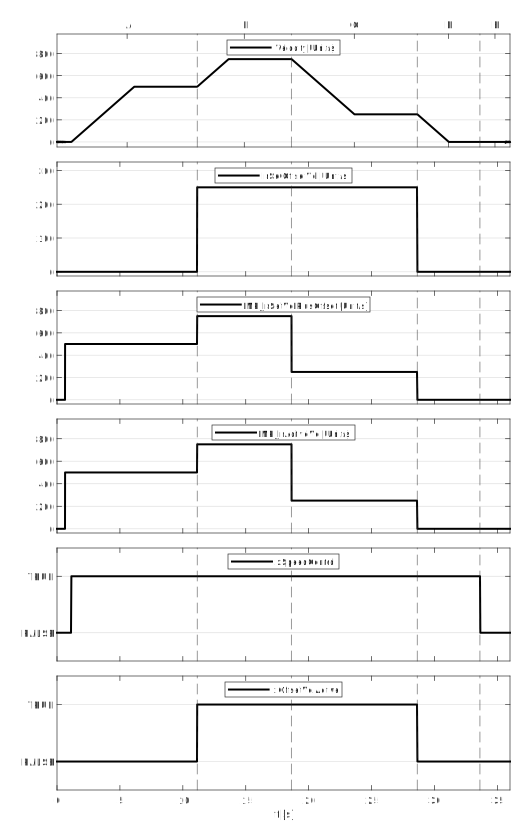
In the example shown here, the preselected speed at the lrSetVel input is 500 units/s. The axis accelerates to the preselected value. An offset of 250 units/s is now added via the lrSetOffsetVel input. The axis accelerates to 750 units/s. The xOffsetVelActive output indicates that an offset is effective.
The value of lrSetVel is now set to zero. The axis does not decelerate to a standstill, but holds the speed of 250 units/s. The offset is similarly set to zero and the axis decelerates to a standstill.
|
No |
xSpeed
|
xOffset
|
eTMState |
INFO |
|---|---|---|---|---|
|
A |
FALSE ä TRUE |
FALSE |
STANDBY ➞ MOVEVEL |
The axis accelerates with limited jerk to the setpoint speed of 500 units/s. |
|
B |
TRUE |
FALSE ä TRUE |
MOVEVEL |
A speed offset of 250 units/s is specified and the axis accelerates to 750 units/s. |
|
C |
TRUE |
TRUE æ FALSE |
MOVEVEL |
The setpoint speed is set to zero and the axis decelerates to 250 units/s. |
|
D |
TRUE |
FALSE |
MOVEVEL |
The speed offset is set to zero and the axis decelerates to a standstill. |
|
E |
TRUE æ FALSE |
FALSE |
MOVEVEL ➞ STANDBY |
Standstill |