Perform positioning
Condition
-
The axis is enabled ( xReadyForMotion = TRUE).
-
A valid travel profile is defined in the profile data management
-
A valid travel profile (1 - 15) is selected in wProfileNumber .
Type
The following profile linkage is executed with a FALSE ä TRUE edge at the xExecutePositioning input:
|
wProfileNumber |
1 |
2 |
|---|---|---|
|
ePositioningMode |
relative |
relative |
|
IrPosition |
500 |
500 |
|
IrVelocity |
300 |
150 |
|
IrAcceleration |
300 |
500 |
|
IrDeceleration |
300 |
500 |
|
IrJerk |
7200 |
7200 |
|
IrFinalVelocity |
0 |
0 |
|
IrTpWindowNeg |
0 |
0 |
|
IrTpWindowPos |
0 |
0 |
|
wTpProfile |
0 |
0 |
|
wSequenceProfile |
2 |
0 |
|
No |
xExecute
|
xAbort |
xFinish
|
xProfile
|
xDriveIn
|
xAbortBusy |
eTMState |
INFO |
|---|---|---|---|---|---|---|---|---|
|
1 |
FALSE ä TRUE |
FALSE |
FALSE |
FALSE ä TRUE |
TRUE æ FALSE |
FALSE |
STANDBY
MOVEREL |
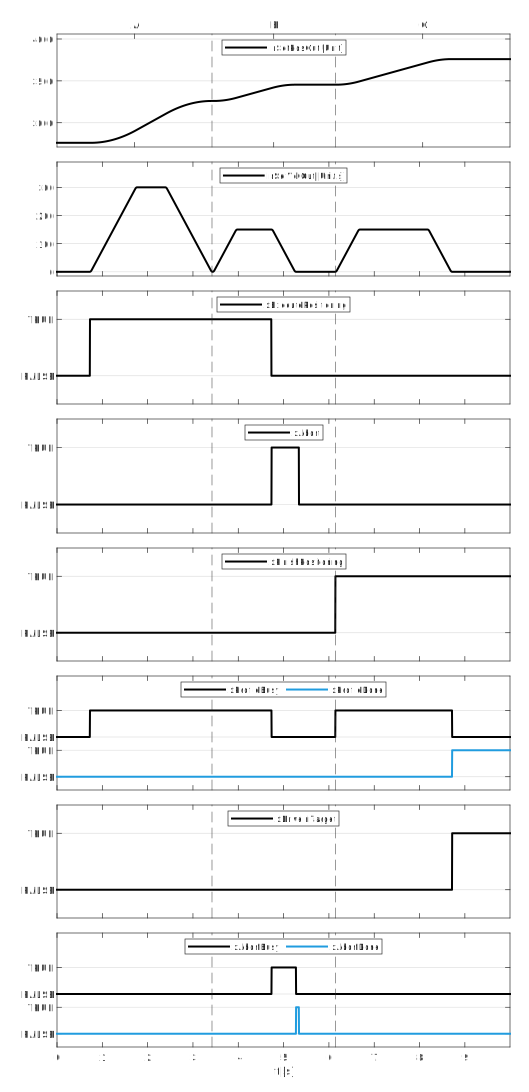
The axis accelerates at 300 unit/s 2 to the speed of travel profile 1 of 300 units/s and travels to the first target position. The profile speed is 0 units/s in the target position. |
|
2 |
TRUE æ FALSE |
FALSE ä TRUE æ FALSE |
FALSE |
TRUE æ FALSE |
FALSE |
FALSE ä TRUE æ FALSE |
MOVEREL
STOP
STANDBY |
The axis accelerates at 500 unit/s 2 to the speed of travel profile 2 of 150 units/s. During the constant travel phase, the relative positioning profile is aborted. The axis runs at the profile deceleration of 500 unit/s 2 to a standstill. |
|
3 |
FALSE |
FALSE |
FALSE ä TRUE TRUE æ FALSE |
FALSE ä TRUE |
FALSE ä TRUE |
FALSE |
JOGGING |
The profile is run to the end with the scCtrlBasicMotion.xFinishPositioning input. As soon as the target position is reached, xDriveInTarget output = TRUE appears. |
