Profile data management
Profile data management manages the parameters of a maximum of 15 travel profiles of type L_TF2P_scPositionProfile .
A travel profile describes a motion task for positioning that is implemented by a rotary motion of the motor shaft.
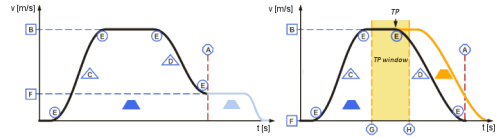
Profile types
|
Symbol |
Description |
|---|---|

|
wProfileNumber Number of the positioning command (1 - 15) performed first |
The travel profile is described by the following parameters:
|
Symbol |
Profile parameters |
|---|---|
|
|
ePositioningMode Selection of the positioning mode |

|
wTpProfile Number of the profile data set (1 - 15) that is to be executed after a detected touch probe. When "0" is set, no travel profile is executed after a touch probe has been detected. |

|
wSequenceProfile Number of the profile data set (1 - 15) that is to be executed after the current travel profile. When "0" is set, no further travel profile will be executed. The travel profile will only be executed if no touch probe has been detected within the touch probe window. |

|
IrPosition Target position or distance to be traversed. lrPosition is either given "absolutely" or "relatively". The absolute position describes the distance from the zero position to the target position. (absolute position = target position) The home position for the absolute position is the zero position. 
The relative position takes the current actual position at the starting time of the travel command into consideration. (relative position = target position - actual position) The home position for the starting point of the distance is the target position of the travel profile executed previously. 
|

|
IrVelocity Maximum velocity used for approaching the target position. Depending on the target position (lrPosition), acceleration (lrAcceleration) and deceleration (lrDeceleration). It is possible that the drive does not reach the maximum velocity. In this case, the graph is shown as a triangle instead of a trapezium. 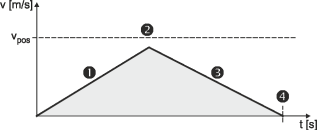
|

|
IrAcceleration Acceleration to reach the maximum velocity (scPar.ascProfiles[Profilnummer].lrVelocity). 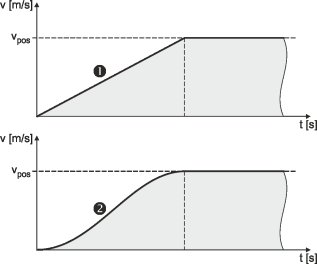
The following acceleration types are distinguished:
|

|
IrDeceleration Deceleration to brake from the maximum velocity (scPar.ascProfiles[Profilnummer].lrVelocity) to a standstill. |

|
IrJerk Jerk limitation for acceleration (scPar.ascProfiles[Profilnummer].lrAcceleration) and deceleration (scPar.ascProfiles[Profilnummer].lrDeceleration). If a jerk limitation is specified for a travel profile, acceleration and deceleration are executed more smoothly via S-shaped ramps. This prevents, for instance, sensitive machine parts from damages. The S-shaped acceleration and deceleration extend the duration of positioning compared to linear acceleration and deceleration. 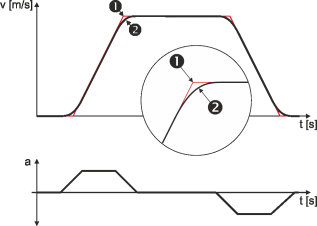
|

|
IrFinalVelocity Final speed the drive uses to execute the next travel profile after reaching the target position. The lrFinalVelocity parameter is only used if a successor profile exists. If there is no successor profile, the setting lrFinalVelocity has no influence on the target position. When the target position has been reached, the next travel profile is executed immediately without braking the drive to a standstill at the target position. The final velocity can be used to achieve velocity switching. The sign of the final velocity acts in the direction of the profile velocity. A negative sign always causes a reversal with respect to the profile velocity. A positive sign causes the final velocity to act in the same direction as the profile velocity. 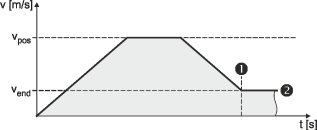
|

|
lrTpWindowNeg Lower limit value for the touch probe window in which a touch probe can be detected. |

|
lrTpWindowPos Upper limit value for the touch probe window in which a touch probe can be detected. |
 Acceleration
 Maximum speed (not reached here)
 Deceleration
 Target position