Document structure
The document structure shows the object structure of the view or page active in the Designer.
The Document organisation window is located in the standard window layout on the left-hand side of the programme interface below the Project explorer window.
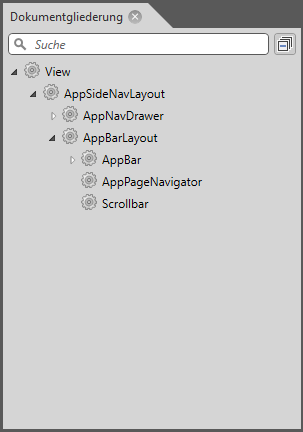
Document structure
The document organisation reflects the structure of the file active in the Designer. It is easy to recognise which controls are contained in which containers.
Mark element
If an element is selected in the Designer, this element is highlighted in dark blue in the document outline. Highlighting via the document outline is particularly useful if an element is not clearly visible in the Designer, e.g. because it has no background colour and no frame.
Search
The document outline has a search function that you can use to search for elements of the document loaded in the Designer. Type the element you are looking for into the Search field. The search works like a filter: as you type, the list of elements is updated dynamically and only hits that match the current input are displayed.
Reduce function
If there are a large number of expanded nodes, the tree can quickly become long and confusing. To regain an overview, you can reduce all expanded nodes at once. To do this, click on the  button next to the search field.