Each project has its own cross-reference. When scanning the project, the cross-reference in a client project searches for uses of unit classes in the client project (in the design area), e.g. in the UnitClassName (Modern UI) property of the controls. The cross-reference of a server project searches for uses of unit classes in the server project, e.g. in the Unit class (display) and Unit class (process) parameters of the variables. In single projects, the client and server are combined so that there is only one cross-reference that performs both searches.
The cross-reference checks for each use whether the respective unit class has been defined and, conversely, whether a defined unit class has been used.
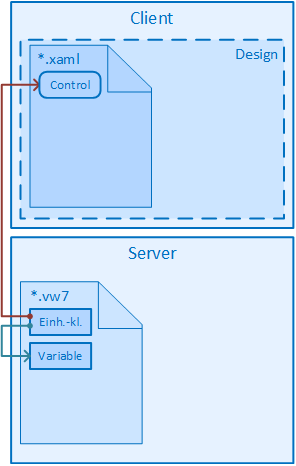
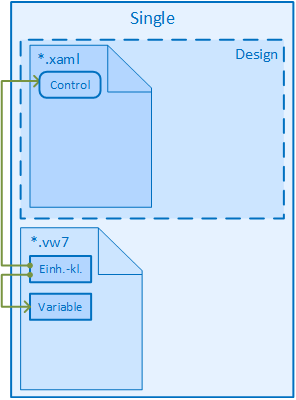
Legend:
-

- The analysis is performed by the cross-reference of the client project. The starting point of the arrow indicates the source of the definition, the tip of the arrow indicates the use of the definition.
-

- The analysis is performed by the cross-reference of the server project. The starting point of the arrow indicates the source of the definition, the tip of the arrow indicates the use of the definition.
-

- In a single project, there is only one cross-reference. The starting point of the arrow indicates the source of the definition, the tip of the arrow indicates the use of the definition.
After scanning the project, the results are displayed in a table in the Unit classes view in the Cross-reference node of the respective project.
The table contains the following columns:
- Name
- Specifies the name of the unit class.
- Status
- Indicates the status of use: either Correct, Warning or Error.
- Status Description
- Detailed information on the status.
- System
- The Variables entry means that the unit class is used in the Variables system module. If Designis specified, the definition in the design area is used.
- Used in
- Specifies the relative path of the form (Classic UI), view (Modern UI) or page (Web UI) where the right is used.
- Source group, source, source detail
- Further details on use