Scale values
Display of values on the numerical scale.
For output control elements that have a scale, values can be displayed on the large scale lines.
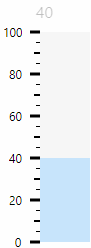
Scale with scale values (0, 20, 40 etc.)
The properties for displaying the scale values can be found in the Properties window in the "MajorLabels" category. Some property names are based on the names of the properties for the labelling and have the same meaning.
Example: Just as the "ShowLabel" property activates the display of the labelling (Label), the "ShowMajorLabels" property activates the display of the scale values (MajorLabels).
MajorLabelsDecimalPlaces
Specifies the number of decimal places displayed for the scale values. By default, the property is set to 0, i.e. the scale values are displayed without decimal places.
This property can be used to move the scale values closer to the scale lines or further away from the scale lines.
To observe the effect of the property, select the RadialInstrument in the Designer, click in the MajorLabelsOffset field in the Properties window and turn the mouse wheel up or down. The larger the values, the greater the distance between the scale bar and the scale value.
Affects these controls: