Bar
Bar chart for displaying a process variable value.
|
Symbol |
|
|
Menu ribbon |
Start > Controls > Input/output > Variable output > Bar |

The "Bar" control element displays a vertical or horizontal bar on which the value of the connected numerical process variable is represented by an indicator, as well as a scale with scale lines and scale values. The bar is used, for example, to display a fill level.
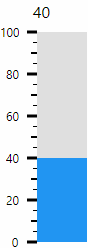
The indicator (blue) of the Bar control element shows the current value of the connected process variable.
Functionalities
The control element supports the following functionality:
-
Connection to an analogue process variable(integer value/floating point value) for the data source
-
Limitation of the displayable value range and coloured display of sub-ranges
-
Display of the bar from the reference value
-
Representation of a numerical scale
-
Display of scale values
-
Display of the current value and the unit in a display for value and unit
-
Connection to the user administration for blocking operability
-
Display of the background, the frame, the shadow, etc.
-
Color display of the background, frame, text, etc., also depending on the status of the control element
You can configure these functionalities via the properties in the Properties window when you select the control in the Designer or in the document outline.
Style
There are no system styles available for the control. You can create your own styles for the control. These styles are available for selection in the "Style" property after creation.
The control element consists of a number of other elements. Both the control itself and its elements can be configured via the properties of the control. Properties for a sub-element of the control can usually be found in the category that bears the name of this element.
Example: The properties for configuring the "Unit" element can be found in the Properties window in the "Unit" category when you select the control element in the Designer or in the document outline.
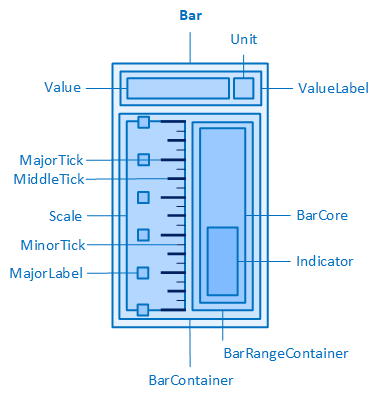
The bar and its elements
The control element contains an internal container(BarContainer, see Structure) for the bar and the scale. The Bar control has the following properties for the BarContainer in the Bar category:
Defines the position and direction of the bar and the scale within the BarContainer.
-
Left
The bar is positioned at the top and the scale at the bottom of the BarContainer, the values run from right to left.
-
Up
The bar is positioned on the right, the scale on the left in the BarContainer, the values run from bottom to top.
-
Right
The bar is positioned at the top and the scale at the bottom of the BarContainer, the values run from left to right.
-
Down
The bar is positioned on the right, the scale on the left in the BarContainer, the values run from top to bottom.
Defines the height of the BarContainer. By default, the property is set to 100 %. This means that the BarContainer occupies the entire available height in the control element. The available height depends, among other things, on whether the display for the value and unit is shown above/below the BarContainer(ShowValueLabel= þ, ValueLabelPosition= Top/Bottom) and what height it has(ValueLabelHeight).
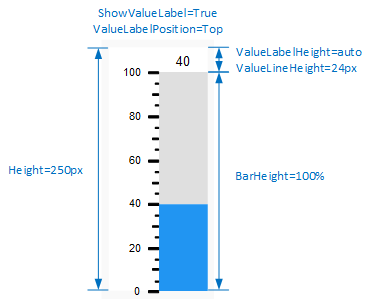
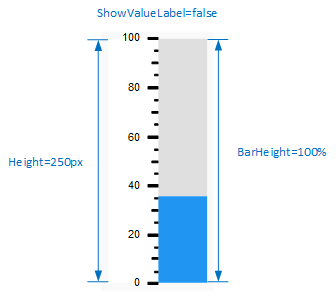
Height of the BarContainer with and without display for value and unit
BarMargin
Defines the outer distances of the BarContainer, i.e. between the edge of the BarContainer and its parent element (bar).
BarPadding
Defines the inner distances of the BarContainer, i.e. between the edge of the BarContainer and the contained elements (Scale and BarRangeContainer).
Defines the width of the BarContainer. The property is set to 100% by default. This means that the BarContainer takes up the entire available width in the control. The available width depends, among other things, on whether the display for the value and unit is shown to the left/right of the BarContainer(ShowValueLabel= þ, ValueLabelPosition= Left/Right) and what width it has(ValueLabelWidth).
Related topics: