Value label
Display of the variable value and the unit in the control element.
The display of a variable value as text or number is a main functionality of the input and output control elements. A "Display for value and unit" (ValueLabel) can be configured for graphical input and output controls(Bar, DonutGauge and Slider), which acts as a container for the value and unit.
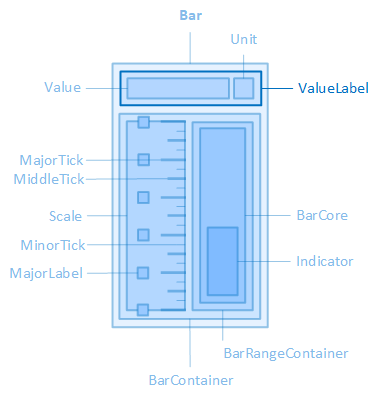
The "ValueLabel" element is contained in the "Bar" control element, for example.
The following properties are available in the "ValueLabel" category to configure this display:
Determines whether the display for value and unit is shown.
-
The display takes up some space in the control element due to the "ValueLabelWidth" and "ValueLabelHeight" settings. If the display is hidden (ShowValueLabel =o), this space may be available for other sub-elements.
ValueLabelBorderRadius
Defines the thickness of the rounding of the corners for the frame of the display for value and unit.
ValueLabelBorderStyle
Defines the type of display frame for the value and unit.
ValueLabelBorderWidth
Defines the thickness of the frame line of the display for value and unit.
Defines the height of the display for value and unit.
ValueLabelMargin
Defines the outer distancesof the display for value and unit, i.e. between the edge of the display and its parent element and its neighbouring elements.
ValueLabelPadding
Defines the inner distancesbetween the display for value and unit and its content (value and unit).
Defines the position of the display for value and unit within the control element.
-
Bar/Thumb
The display for the value and unit moves with the indicator/handle when the variable value and therefore the position of the indicator/handle changes.
-
Left
The display for value and unit is shown on the left of the control element.
-
Left-top
The display for the value and unit is shown in the top left-hand corner of the control element.
-
Left-bottom
The display for the value and unit is shown in the bottom left-hand corner of the control element.
-
Top
The display for value and unit is shown at the top of the control element.
-
Right
The display for value and unit is shown on the right-hand side of the control element.
-
Right-top
The display for the value and unit is shown in the top right-hand corner of the control element.
-
Right-bottom
The display for the value and unit is shown in the bottom right-hand corner of the control element.
-
Bottom
The display for value and unit is shown at the bottom of the control element.
-
Centre
The display for value and unit is shown in the centre of the control element.
Defines the width of the display for value and unit.
Affects these controls: