Value
Display of the variable value in the control element.
The display of a variable value as text or number is a main functionality of the input and output control elements. The control element obtains the value from a variable definition and displays it in a value display ("Value" element).
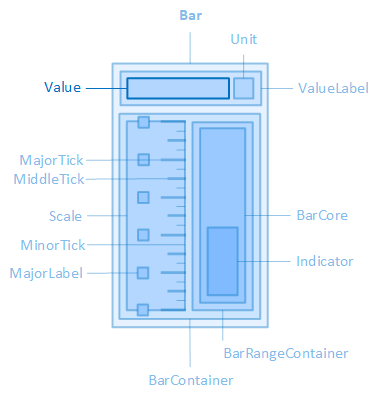
The "Value" element, for example, is contained in the "Bar" control element.
The variable definition is linked to the control element via the VariableName property. The layout, display, paragraph and font of the value display can be configured via the properties of the Valuecategory of the control element, the colours of the value display via the properties of the Colors category.
The layout of the value display can be configured using the following properties:
ValueContainerHeight
Defines the height of the container that contains the value and the unit.
ValueContainerWidth
Defines the widthof the container that contains the value and the unit.
ValueHeight
Defines the height of the value display.
ValueMargin
Defines the outer spacing of the value display, i.e. between the edge of the value display and its parent or neighbouring element.
ValuePadding
Defines the internal spacing of the value display, i.e. between the edge of the value display and its content (the text of the value display).
ValueWidth
Defines the widthof the value display.
Appearance
The following properties are available for displaying the value display:
ShowValue
Determines whether the value display should be shown.
ValueContainerBorderRadius
Defines the rounding of the corners for the frame of the container that contains the value and the unit.
ValueContainerBorderStyle
Defines the style of the container frame that contains the value and the unit.
ValueContainerBorderWidth
Defines the thickness of the frame line of the container that contains the value and the unit.
Paragraph
The line height and the text alignment of the value display are configured using the following properties:
ValueLineHeight
Defines the height of the text line(s) of the value display. See also CSS reference: line-height
ValueTextAlignment
Defines the horizontal alignment of the text within the value display. See also CSS reference: text-align
Font
The font used in the value display is configured using the following properties:
ValueFontClass
Defines the font class of the value.
-
The property contains a list of font classes from which one can be selected. The settings are obtained from a CSS file (fontclasses.css), which can be found in the "resources\typography" folder in the client project directory.
ValueFontSize
Defines the font size of the value. See also CSS reference: font-size
ValueFontWeight
Determines how thick or thin the characters of the value should be displayed. See also CSS reference: font-weight
ValueTextContrast
Determines how light the font of the value should be displayed, from 1 (opaque, default setting) to 0.5 (semi-transparent) to 0 (completely transparent). See also CSS reference: opacity
Affects these controls: