TextVarOut
Output field for an alphanumeric process variable.
|
Symbol |
|
|
Menu ribbon |
Start > Controls > Input/output > Variable output > TextVarOut |

The "TextVarOut" control outputs a string variable value.
Example: The TextVarOut can be used to display the name of the currently loaded recipe file.
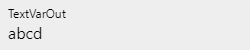
TextVarOut
Functionalities
The control element supports the following functionality:
-
Connection to a specific process variable for the data source
-
Display of a language-switchable text for labelling
-
Display of a graphic in the control element
-
Display of the value in the control element
-
Connection to the user administration for blocking operability
-
Display of the background, the frame, the shadow, etc.
-
Color display of the background, frame, text, etc., also depending on the status of the control element
You can configure these functionalities via the properties in the Properties window when you select the control in the Designer or in the document outline. Whether a property is visible in the properties window depends on the style of the control.
Style
By default, the control uses the "Plain.Default" style. Other system styles are available for the control in the "Style" property from the "General properties" category.
Certain properties may be missing in the Properties window for styled controls. For example, the "Colors" category is not available for controls in the system styles. These properties cannot be edited in the system styles.
You can also create your own styles for the control element. These styles are available for selection in the "Style" property after creation.
The control element consists of a number of other elements. Both the control itself and its elements can be configured via the properties of the control. Properties for a sub-element of the control can usually be found in the category that bears the name of this element.
Example: The properties for configuring the "Label" element can be found in the Properties window in the "Label" category when you select the control element in the Designer or in the document outline.
In the "Plain.Default" and "Material.Default" styles, the respective containers for the label and the value (Label and ValueContainer) are positioned one below the other, i.e. in a column. If the style of the control is reset, these elements are positioned next to each other, i.e. in a row.
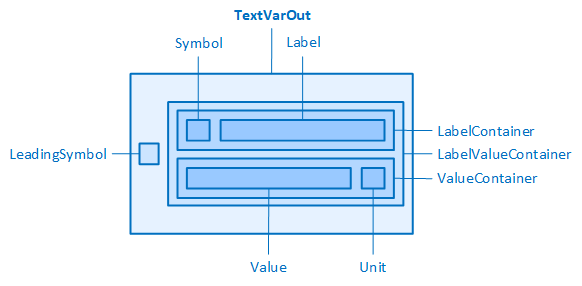
The TextVarOut and its elements (styles Plain.Default and Material.Default)
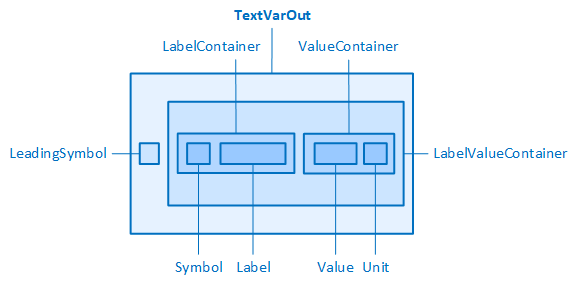
The TextVarOut and its elements (style reset)
Related topics: