Label
Display of a labelling text in addition to the variable value.
The label is a text that is displayed in addition to a graphical representation (e.g. tick, graphical slide switch) of the control element. The text can be defined as a constant in the control or obtained from a text definition of the EASY UI Designer system module language switching. If the control also supports the connection to a process variable, the text can alternatively be obtained from the connected variable definition of the Variables system module. This text can then also be language-switched.
The labelling is displayed in a "Label" element.
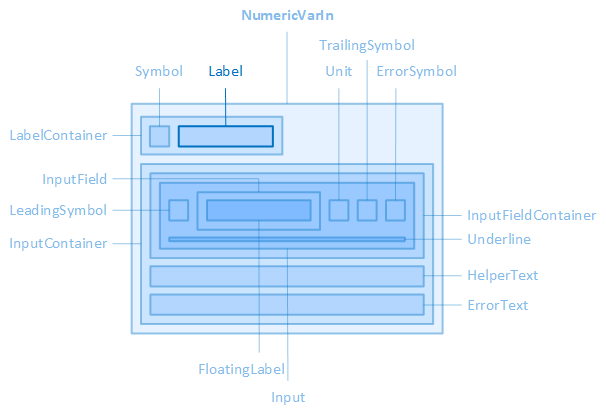
The "Label" element, for example, is contained in the "NumericVarIn" control element.
The source, layout, display, paragraph and font of the label can be configured via the properties of the "Label" category of the control, the colours of the label via the properties of the "Colors" category.
In the system styles of the "Plain" and "Material" style families, some controls display a floating label within the input field (FloatingLabel) instead of a normal label above the input field (Label). This label is called floating because it floats above the actual input. If the input field is empty and the control element is not in the "Focused" state, the "FloatingLabel" is displayed instead of the input.
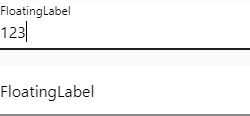
FloatingLabel for NumericVarIn (Plain.Default)
If a floating label is provided for a control element, the source, layout, display and font of the floating label can be defined via the properties of the "FloatingLabel" category of the control element.
The property names for the floating label are based on the names of the properties for the label and have the same meaning.
Example: Just as the "LocalizableLabelText" property defines the language-switchable text for the "Label" element, the "LocalizableFloatingLabelText" property defines the language-switchable text for the "FloatingLabel" element.
The colours of the floating label are defined via the properties of the "Colors" category of the control element.
Source
The following properties define the labelling text or the source of the labelling text:
LabelText (LabelTextOff/LabelTextOn)
Use this property if the labelling is language-independent, e.g. a name or a short description.
-
Some controls with a variable connection can display different texts depending on the variable value. If the value of the variable is false, the text of the "LabelTextOff" property is displayed; if the value is true, the text of the "LabelTextOn" property is displayed.
LocalizableLabelText (LocalizableLabelTextOff/LocalizableLabelTextOn)
If the labelling is to be language-dependent, the text selection dialogue can be opened here via the  button. This establishes the connection to an EASY UI Designer text definition. The property then saves the full name of the text definition.
-
The note for "LabelTextOff/LabelTextOn" applies accordingly to "LocalizableLabelTextOff/LocalizableLabelTextOn".
UseVariableText
If the control element supports the connection to a process variable, this property is available. If the option is activated, the labelling is taken from the Textparameter of the variable definition.
Only use one of the properties for the text source so that it is clearly recognisable for you.
Layout
The layout of the labelling can be configured using the following properties:
LabelContainerHeight
Defines the height of the container that contains the symbol and the labelling.
LabelContainerWidth
Defines the widthof the container that contains the symbol and the labelling.
LabelHeight
Defines the height of the labelling.
LabelMargin
Defines the outer spacing of the label, i.e. between the edge of the label and its parent or neighbouring element.
LabelPadding
Defines the internal spacing of the label, i.e. between the edge of the label and its content, i.e. the actual labelling text.
LabelPosition
Defines the position of the labelling within the control element.
-
Only two settings are available for some control elements, e.g. "Left" and "Right" for the checkbox.
-
Left
The labelling is positioned on the left-hand side of the control element.
-
Top
The label is positioned at the top of the control element.
-
Bottom
The label is positioned at the bottom of the control element.
-
Right
The labelling is positioned on the right-hand side of the control element.
LabelWidth
Defines the widthof the labelling.
Representation
The following properties are available for displaying the labelling:
LabelContainerBorderRadius
Defines the thickness of the rounding of the corners for the frame of the container that contains the symboland the labelling.
LabelContainerBorderStyle
Defines the type of container frame that contains the symbol and the labelling.
LabelContainerBorderWidth
Defines the thickness of the frame line of the container that contains the symbol and the labelling.
ShowLabel
Determines whether the labelling should be displayed.
Paragraph
The line height and text alignment of the labelling are configured using the following properties:
LabelLineHeight
Defines the height of the text line of the caption. See also CSS reference: line-height
LabelTextAlignment
Defines the horizontal alignment of the caption text within the caption. See also CSS reference: text-align
font
The font of the labelling text is configured using the following properties:
LabelFontClass
Defines the font class of the labelling text.
-
The property contains a list of font classes from which one can be selected. The settings are obtained from a CSS file (fontclasses.css), which can be found in the resourcesWtypography folder in the client project directory.
LabelFontSize
Defines the font size of the labelling text. See also CSS reference: font-size
LabelFontWeight
Determines how thick or thin the letters of the labelling text should be displayed. See also CSS reference: font-weight
LabelTextContrast
Determines how light the labelling text should be displayed, from 1 (opaque, default setting) to 0.5 (semi-transparent) to 0 (completely transparent). See also CSS reference: opacity.
LabelUppercase
Determines whether the labelling text is displayed in capital letters. See also CSS reference: text-transform
Related topics:
Affects these controls:
Checkbox, DateTimeVarIn, DateTimeVarOut, DropDownBox, NumericVarIn, NumericVarOut, PieSegment, RadioButton, SelectBox, StackedDonutGaugeSegment, Switch, TextVarIn, TextVarOut