DateTimeVarOut
Output for a date and/or a time.
|
Symbol |
|
|
Menu ribbon |
Start > Controls > Input/output > Variable input > DateTimeVarOut |

The "DateTimeVarOut" control element outputs a time. The date, the time or both can be processed from the time. A process variable of type VT_DATE must be selected as the target specification.

DateTimeVarOut with output of the date and time
Functionalities
The control element supports the following functionality:
-
Connection to a specific process variable for the data source
-
Display of the date
-
Display of the time
-
Different date and time formats
-
Automatic positioning of the date and time display within the control element
-
Display of a language-switchable text for labelling
-
Display of graphics in the control element
-
Connection to the user administration for blocking operability
-
Display of the background, the frame, the shadow, etc.
-
Color display of the background, frame, text, etc., also depending on the status of the control element
You can configure these functionalities via the properties in the Properties window when you select the control in the Designer or in the document outline. Whether a property is visible in the properties window depends on the style of the control.
Style
By default, the control uses the "Plain.Default" style. Other system styles are available for the control in the"Style" property from the "General properties" category.
Certain properties may be missing in the Properties window for styled controls. For example, the "Colors" category is not available for controls in the system styles. These properties cannot be edited in the system styles.
You can also create your own styles for the control element. These styles are available for selection in the "Style" property after creation.
The control element consists of a number of other elements. Both the control itself and its elements can be configured via the properties of the control. Properties for a sub-element of the control can usually be found in the category that bears the name of this element.
Example: The properties for configuring the "Label" element can be found in the Properties window in the "Label" category when you select the control element in the Designer or in the document outline.
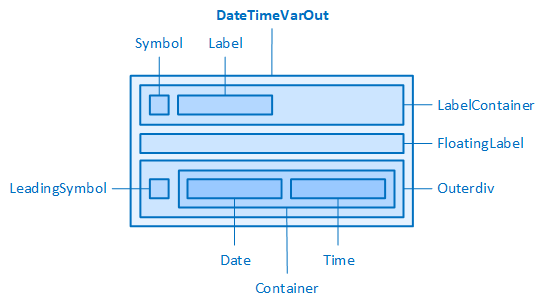
The DateTimeVarOut and its elements
Automatic positioning of the date and time display
The control element automatically positions the date display ("Time" element) and the time display ("Date" element) within its container ("Container" element, see Structure). The positioning depends on the setting of the"DateTimeMode" property on the one hand and on the settings of the "AlignItems" and "JustifyContent" properties on the other.
AlignItems
Defines the alignment of the "Date" and "Time" elements within the row/column. The property is perpendicular to the setting of the "DateTimeMode" property.
-
Start
Aligns the elements to the top edge of the row or to the left edge of the column.


AlignItems=Start, JustifyContent=Centre, DateTimeMode=...
-
End
Aligns the elements to the bottom edge of the row or to the right edge of the column.
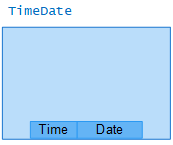
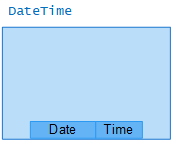
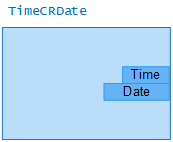
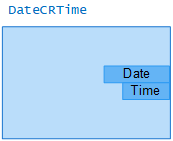
AlignItems = End, JustifyContent = Centre, DateTimeMode = ...
-
Centre
Places the elements in the centre of the row/column.


AlignItems = Centre, JustifyContent = Centre, DateTimeMode = ...
-
Baseline
Aligns the elements to the base line (baseline, font line) of your texts.


AlignItems = Baseline, JustifyContent = Centre, DateTimeMode = ...
-
Stretch
The elements are stretched so that they take up the entire row height/column width.


JustifyContent
Defines the alignment of the Date and Time elements within the row/column. The property acts in the direction of the setting of the "DateTimeMode" property.
-
Start
Aligns the elements at the beginning of the respective row/column.
-
A column starts at the bottom of the control element at "DateTimeMode" = "TimeCRDate" and at the top at "DateTimeMode" = "DateCRTime".


JustifyContent = Start, AlignItems = Centre, DateTimeMode = ...
-
-
End
Aligns the elements at the end of the row/column.
-
A column ends at the top of the control element at "DateTimeMode" = "TimeCRDate" and at the bottom at "DateTimeMode" = "DateCRTime".


JustifyContent = End, AlignItems = Centre, DateTimeMode = ...
-
-
Centre
Aligns the elements in the centre of the row/column.


JustifyContent = Centre, AlignItems = Centre, DateTimeMode = ...
-
Space-between
Inserts the space available in the row/column between the elements.


JustifyContent = Space-between, AlignItems = Centre, DateTimeMode = ...
-
Space-around
Distributes the space available in the row/column evenly around each element.


JustifyContent = Space-around, AlignItems = Centre, DateTimeMode = ...
-
Space-evenly
Distributes the space available in the row/column evenly between an element and the edge of the control/the next element.
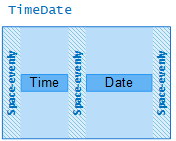
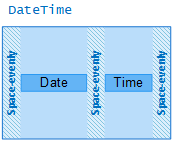
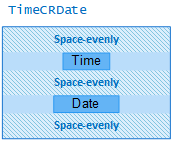
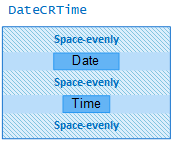
JustifyContent = Space-evenly, AlignItems = Centre, DateTimeMode = ...
Related topics: