Time
Display of the value of a variable of type VT_DATE in the control element.
Some controls can display a time. The control obtains the value from a variable definition of type VT_DATE and displays it in a time display ("Time" element).
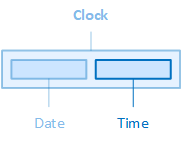
The "Date" element, for example, is contained in the "Clock" control element.
The variable definition is linked to the control element via the VariableName property. The layout, the paragraph and the font of the time display can be configured via the properties of the Timecategory, the colours of the time display via the properties of the Colors category.
Layout
The layout of the time display is configured using the following properties:
TimeHeight
Defines the height of the time display.
TimeMargin
Defines the outer distances of the time display, i.e. between the edge of the time display and its parent or neighbouring element.
TimePadding
Defines the internal spacing of the time display, i.e. between the edge of the time display and its content, i.e. the actual time.
TimeWidth
Defines the widthof the time display.
Paragraph
The line height and text alignment of the time display are configured using the following properties:
TimeLineHeight
Defines the height of the text line of the time display. See also CSS reference: line-height
TimeTextAlignment
Defines the horizontal alignment of the text within the time display. See also CSS reference: text-align
Font
The font used in the time display is configured using the following properties:
TimeFontClass
Defines the font class of the time specification.
-
The property contains a list of font classes from which one can be selected. The settings are obtained from a CSS file (fontclasses.css), which can be found in the resourcesWtypography folder in the client project directory.
TimeFontSize
Defines the font size of the time specification. See also CSS reference: font-size
TimeFontWeight
Determines how thick or thin the characters of the time specification should be displayed. See also CSS reference: font-weight
TimeTextContrast
Determines how bright the time specification should be displayed, from 1 (opaque, default setting) to 0.5 (semi-transparent) to 0 (completely transparent). See also CSS reference: opacity
-
The "TimeTextContrast" property also affects the background colour of the time display. If a background colour has been defined via the "TimeBackgroundColor" property, it may appear lighter (more transparent) depending on the setting of the "TimeTextContrast" property.
Affects these controls: