PieChart
Pie chart for displaying multiple values.
|
Symbol |
|
|
Menu ribbon |
Start > Controls > Input/output > Variable output > PieChart |

The "PieChart" control element displays variable values as segments of a ring. In order to visualise the respective share of a value in the total value of all values considered, the individual segments are displayed in different colours. In addition to the actual diagram, the PieChart can display a legend to describe the individual segments.
Example: The PieChart can be used, for example, to show how often certain alarms occur in comparison to the total frequency of all alarms or how long certain alarms are active in comparison to the total duration of all alarms.
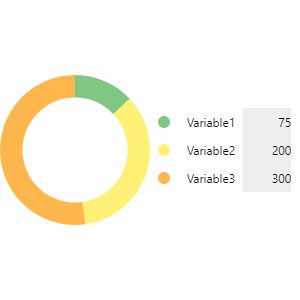
PieChart with three segments
Functionalities
The control element supports the following functionality:
-
Representation of the ring diagram
-
Representation of the segments
-
Presentation of the legend
-
Connection to the user administration for blocking operability
-
Display of the background, the frame, the shadow, etc.
-
Color display of the background, frame, text, etc., also depending on the status of the control element
You can configure these functionalities via the properties in the Properties window when you select the control in the Designer or in the document outline.
Style
There are no system styles available for the control. You can create your own styles for the control. These styles are available for selection in the "Style" property after creation.
Internally, the PieChart consists of two main elements: the "PieCore", which contains a graphic (SVG) that draws a ring of defined segments, and the "PieLegend", which represents the legend for the graphic.
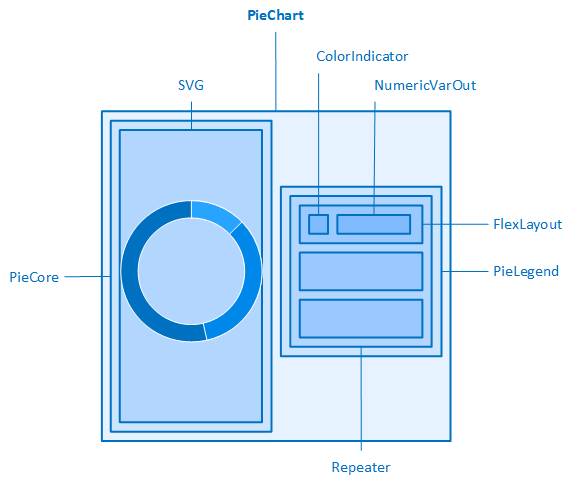
The control element contains a graphic (SVG) that represents a ring. The PieChart can only be used effectively if at least two segments have been configured. In addition, the following can be configured for the ring diagram via properties in the "PieChart" category:
-
Width and height of the PieCore (PieWidth, PieHeight)
-
Outer distances of the PieCore (PieMargin)
-
Inner spacing of the PieCore (PiePadding)
-
Inner and outer radius of the ring(InnerRadius, OuterRadius)
To display variable values as segments in the ring, a "PieSegment" element must be added to the PieChart for each variable. The PieChart contains a PieSegment by default.
To add PieSegments or remove existing ones, open the Collection Editorvia the  button behind the "Segments" property.
The PieSegment supports the following functionality::
-
Connection to an analogue process variable(integer value/floating point value) for the data source. The value of the variable determines the length of the segment. The value is also displayed as a number in the NumericVarOut element within the legend.
-
Display of a language-switchable text for the labelling. The label is displayed in the NumericVarOut element within the legend.
-
Display of the unitin addition to the variable value. The unit is displayed in the NumericVarOut element within the legend.
The following can also be configured for the display of the element:
-
Color of the segment(FillColor)
-
Inner and outer radius of the segment(InnerRadius, OuterRadius)
-
These properties are empty by default. This means that the segments adopt the inner and outer radius of the ring by default.
-
The legend (PieLegend) creates an entry for each new PieSegment(FlexLayout). This contains a ColorIndicator and a NumericVarOut. The colour configured in the "FillColor" property of a PieSegment is used both for the PieSegment and for the corresponding ColorIndicator. The labelling, the unit and the value of a PieSegment are also displayed in the corresponding NumericVarOut.
The "ShowLegend" property is used to specify whether the legend should be displayed. The following can also be configured for the legend via the properties of the "Legend" category:
-
Width and height of the PieLegend (LegendWidth, LegendHeight)
-
Outer distances of the PieLegend (LegendMargin)
-
Inner spacing of the PieLegend (LegendPadding)
-
Border of the PieLegend (LegendBorderRadius, LegendBorderStyle, LegendBorderWidth)
-
Positioning(LegendPosition) and alignment(LegendAlignment) of the PieLegend and PieCore within the control element
Defines the position of the legend and the ring diagram within the control element. The name for the setting (Left, Top, Right, Bottom) refers to the position of the legend relative to the ring diagram.
-
As the size of the ring diagram is set to 100 % by default (PieHeight, PieWidth), the settings of the "LegendPosition" and "LegendAlignment" properties only have a visible effect on the legend. If the height and width of the ring diagram are reduced (e.g. to 40 %), it becomes visible that the position and alignment of the ring diagram are influenced by these properties.
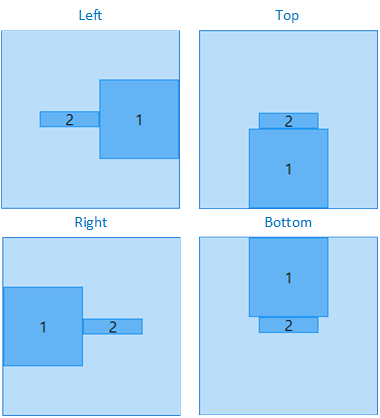
Position of the legend (2) and the ring diagram (1) with LegendAlignment=Centre
Defines the alignment of the legend and the ring diagram. The property is perpendicular to the "LegendPosition" setting:
-
If "LegendPosition"="Left"/"Right", then the vertical alignment of the legend and the ring diagram is defined via "LegendAlignment" (Top, Bottom, Centre).
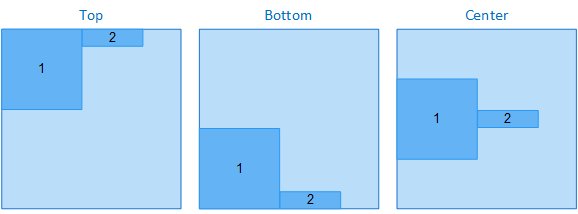
Alignment of the ring diagram (1) and the legend (2) with LegendPosition=Right
-
If "LegendPosition"="Top"/"Bottom", then the horizontal alignment of the legend and the ring diagram is defined via "LegendAlignment" (Left, Right, Centre).
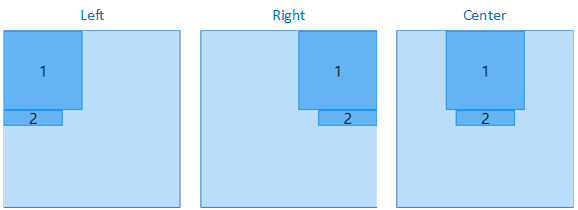
Alignment of the ring diagram (1) and the legend (2) with LegendPosition=Bottom
Related topics: