DateTimeVarIn
Input/output for a date and/or a time.
|
Symbol |
|
|
Menu ribbon |
Start > Controls > Input/output > Variable input > DateTimeVarIn |

The "DateTimeVarIn" control element is used to enter and output a time. The date, the time or both can be processed from the point in time. A process variable of type VT_DATE must be selected as the target specification.
Users can type the date and time directly into the input field or select them using a dialogue that is opened by clicking on the calendar symbol on the right-hand side of the control element.

DateTimeVarIn with input
Functionalities
The control element supports the following functionality:
-
Connection to a specific process variable for the data source
-
Buffering of user input for delayed writing of a process variable
-
Display of an error symbol and an error text if input limits are exceeded or if the date is invalid (31 February)
-
Different date and time formats
-
Display of a language-switchable text for labelling
-
Display of a language-switchable help text
-
Display of graphics in the control element
- Display of the input field
-
Connection to the user administration for blocking operability
-
Display of the background, the frame, the shadow, etc.
-
Color display of the background, frame, text, etc., also depending on the status of the control element
You can configure these functionalities via the properties in the Properties window when you select the control in the Designer or in the document outline. Whether a property is visible in the properties window depends on the style of the control.
Style
By default, the control uses the "Plain.Default" style. Other system styles are available for the control in the "Style" property from the "General properties" category.
Certain properties may be missing in the Properties window for styled controls. For example, the "Colors" category is not available for controls in the system styles. These properties cannot be edited in the system styles.
You can also create your own styles for the control element. These styles are available for selection in the "Style" property after creation.
Structure
The control element consists of a number of other elements. Both the control itself and its elements can be configured via the properties of the control. Properties for a sub-element of the control can usually be found in the category that bears the name of this element.
Example: The properties for configuring the "Label" element can be found in the Properties window in the "Label" category when you select the control element in the Designer or in the document outline.
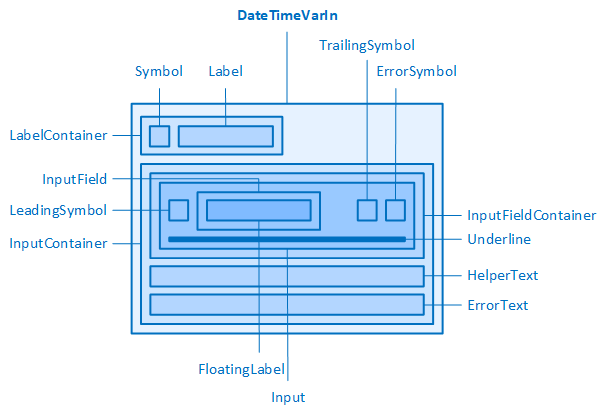
The DateTimeVarIn and its elements
Input field (Input, InputContainer, ...)
The DateTimeVarIn contains aninput field into which a date and time can be entered at runtime.
If the style of the DateTimeVarIn is reset, the following can be configured via the properties of the "Input" category:
-
Width and height of the "InputContainer" element (InputContainerWidth, InputContainerHeight)
-
Width and height of the "Input" element (InputWidth, InputHeight). The height is also automatically adopted for the higher-level "InputFieldContainer".
-
Outer distances of the "InputField" element (InputFieldMargin). The values for left and right automatically set the inner distances for the "Input" element.
You can move the input further to the right using the value for Left of the "InputFieldMargin" property.
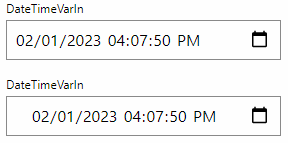
InputFieldMargin for left of 8 px (default setting) and 24 px
-
Border around the "Input" element (InputBorderRadius, InputBorderStyle, InputBorderWidth)
-
Text font and line height in the "Input" element (InputFontClass, InputTextContrast, InputFontSize, InputFontWeight, InputLineHeight)
The following illustration shows how the elements are structurally connected and which properties affect which element:
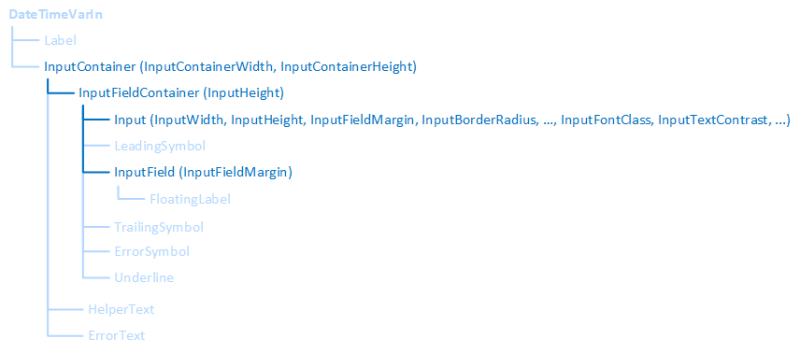
InputContainer and its elements
Related topics: