Error text
Display of a text in the control element in the event of an error.
The error text is displayed below the input field of an input control if the user input exceeds the defined limits. The text can be defined as a constant in the control or obtained from the language switch fromEASY UI Designer.
The error text is displayed in an error text display ("ErrorText" element).
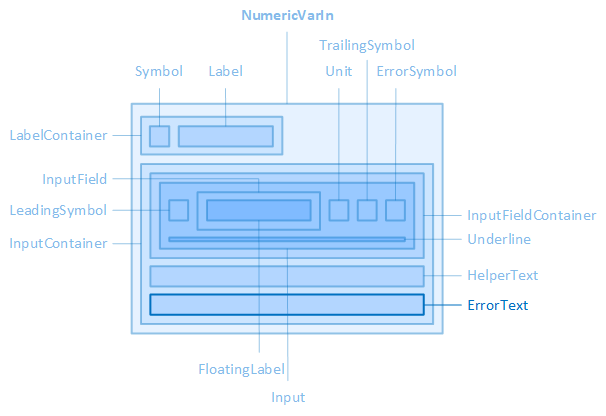
The "ErrorText" element is contained in the "NumericVarIn" control element, for example.
The source, layout, display, paragraph and font of the error text can be configured via the properties of the "ErrorText" category of the control, the colours of the error text via the properties of the "Colors" category.
-
The error text is not displayed by default. If you want to display the error text in the control element, activate the "ShowErrorText" property.
Source
The following properties define the text itself or the text source:
LimitMaxErrorText/LimitMinErrorText
If the input exceeds the limit value specified in the "RawLimitMax" property, the text specified in the "LimitMaxErrorText" property is displayed in the control. Similarly, the text specified in the "LimitMinErrorText" property is displayed if the value falls below the lower limit value (RawLimitMin). Use these properties if the error texts are language-independent.
LocalizableLimitMaxErrorText/LocalizableLimitMinErrorText
If the error texts are to be language-dependent, the text selection dialogue can be opened here via the  button. This establishes the connection to an EASY UI Designer text definition. The property then saves the full name of the text definition.
-
The "LocalizableLimitMaxErrorText"/"LocalizableLimitMinErrorText2" properties have priority over the "LimitMaxErrorText"/"LimitMinErrorText" properties.
Layout
The layout of the error text display can be configured using the following properties:
ErrorTextHeight
Defines the height of the error text display.
ErrorTextMargin
Defines the outer distances of the error text display, i.e. between the edge of the error text display and its parent or neighbouring element.
ErrorTextWidth
Defines the width of the error text display.
Appearance
The following properties are available for displaying the error text:
ShowErrorText
Determines whether the error text should be displayed.
Paragraph
The text alignment and the line height of the error text display are configured using the following properties:
ErrorTextAlignment
Defines the horizontal alignment of the error text within the error text display. See also CSS reference: text-align
ErrorTextLineHeight
Defines the height of the text line of the error text display. See also CSS reference: line-height
Font
The font of the error text is configured using the following properties:
ErrorTextContrast
Defines how light the font of the error text should be displayed, from 1 (opaque, default setting) to 0.5 (semi-transparent) to 0 (completely transparent). See also CSS reference: opacity
ErrorTextFontClass
Defines the font class of the error text.
-
The property contains a list of font classes from which one can be selected. The settings are obtained from a CSS file (fontclasses.css), which can be found in the resourcesWtypography folder in the client project directory.
ErrorTextFontSize
Defines the font size of the error text. See also CSS reference: font-size
ErrorTextFontWeight
Determines how thick or thin the letters of the error text should be displayed. See also CSS reference: font-weight
Related topics:
Affects these controls: