Procedure
The translation of texts is divided into several steps. These can also be carried out separately for different target languages. The steps can also take place at different times and in different places.
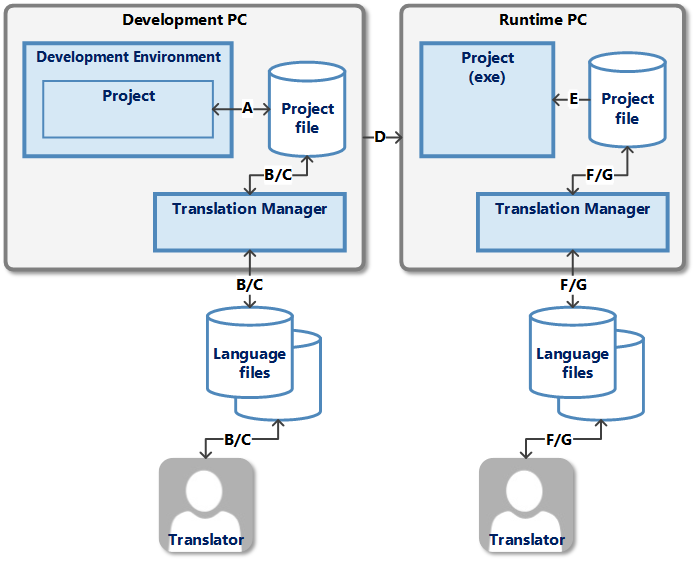
Development PC
The project has reached a certain stage. When developing the project (step A), the developer defined a number of texts that need to be translated into specific languages. These texts are to be translated before the project is installed on the runtime PC (step D). This requires an export (step B) of these texts. The exported texts are sent to the translator. Once the texts have been translated, they are imported back into the project (step C).
Exporting and importing can take place at different times for different languages and can also be carried out several times.
Runtime PC
The project is installed on the runtime PC with the texts already translated. The texts are read in when the project is started (step E). During operation, the user may change the interface language. This may reveal some texts that contain spelling errors or where the meaning is unclear, incomprehensible or even incorrect. An export (step F) can also be carried out at this point to correct these texts. The texts are then corrected by an editor or translated by a translator with the correct meaning. The texts are then imported again (step G). The project must then be restarted once so that the new texts can be used (step E).
Steps B/C and F/G, for which the translation manager is responsible, are explained below.
Export (steps B and F)
-
The translation manager is started and the project file is selected.
-
The desired settings are made on the Export tab and the export is started using the Export button.
-
One or more files containing the desired texts are created in the selected directory.
-
-
These files are sent to the responsible translator.
-
After a certain processing time, the translator sends these files back.
Import (steps C and G)
-
The translation manager is started and the project file is selected.
-
One of these files is selected on the Import tab. The desired settings are made and the import is started using the Import button.
-
The translated texts are imported into the project.
-
The project can continue to be edited while a translation is in progress. If new texts or new languages are added to the project, this requires the above steps to be repeated.
To avoid data loss in the project, the project should be closed in the development system during export or import!