Write access protection in the »EASY Starter«
If a write access protection is active for the online connected inverter, it is displayed in the status bar of the »EASY Starter«:
|
Display
|
Representation of the parameters in the »EASY Starter«
|
|
No write access
|
All parameters in all dialogs are displayed as read-only parameters.
|
|
Only favorites
|
Except for the favorites, all parameters in all dialogs are displayed as read-only parameters.
|
 No write access
An active write access protection can be removed when the PIN is known.
How to remove an active write access protection temporarily:
1.
Click the symbol in the toolbar.
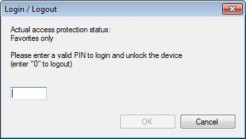
The "Log in / Log off" dialog box is displayed:
2.
Enter the valid PIN and confirm with OK.

After 10 invalid entries, the log-in function is inhibited. In order to remove the log-in inhibit, the inverter must be switched off and on again.
The write access protection gets active again:
–
Automatically 10 minutes after the last login or after the last active write access. It takes max. 10 minutes to be automatically logged out again after each write access.
–
Automatically after the mains voltage is switched on again.
–
Manually by entering a "0" in the dialog box "Log in / Log off" (see above).
Configuring the write access protection with »EASY Starter«
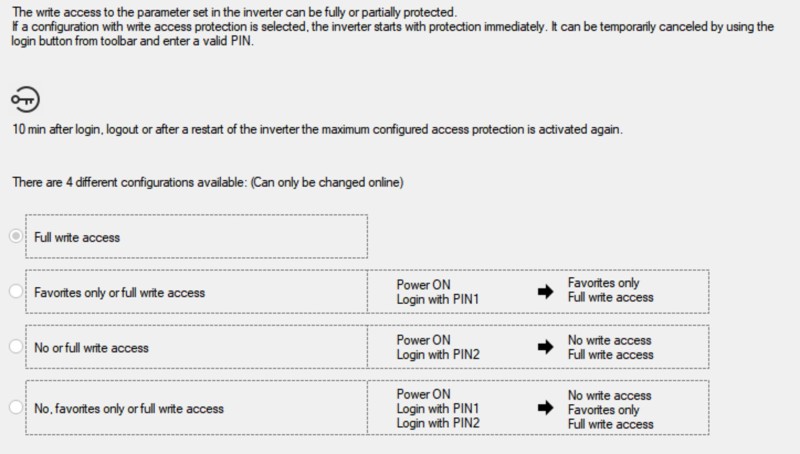
The write access protection is activated by specifying PIN1 and/or PIN2 (depending on the desired configuration of the write access protection).
How to activate the write access protection:
1.
Go to the "Settings" tab and navigate to the "Access protection" parameterisation dialog:
2.
Select the desired configuration of the write access protection.
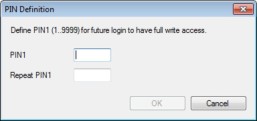
The "PIN definition" dialog box is displayed. The possible entries depend on the selected configuration.
3.
Enter the desired PIN(s) and confirm with OK.
After successful execution, the write access protection is immediately effective and is displayed in the »EASY Starter« status bar.
4.
For a permanent acceptance of the configuration: Save parameter settings in the device.
 Save parameter settings in the device.
How to change already defined PIN(s):
1.
Remove the active write access protection temporarily (see above).
2.
Select the "Full write access" configuration in the "Access protection" parameterisation dialog.
3.
Select again the desired configuration of the write access protection.
4.
Enter new PIN(s) and confirm with OK.
5.
Save parameter settings in the device.
How to remove a configured write access protection permanently:
1.
Remove the active write access protection temporarily (see above).
2.
Select the "Full write access" configuration in the "Access protection" parameterisation dialog.
3.
Save parameter settings in the device.
Impact of the write access protection on »EASY Starter« functions
The following »EASY Starter« functions are not supported when write access protection is active:
–
Parameter set download
–
Definition of the "Favorites" parameters.
–
Definition of the parameters for the "Parameter change-over" function
The following »EASY Starter« functions are supported irrespective of whether write access protection is active:
–
Optical device identification 0x2021:001 (P230.01)
–
Enable/inhibit inverter
–
Resetting parameters to default 0x2022:001 (P700.01)
–
Save parameter set 0x2022:003 (P700.03)
–
Load user parameter 0x2022:004 (P700.04)
–
Load OEM parameter 0x2022:005 (P700.05)
–
Error reset 0x2631:004 (P400.04)