Write access protection in the keypad
If a write access protection is active for the inverter, the keypad automatically displays a log-in when changing to the parameterisation mode. You can either skip the log-in and thus keep the access protection active or remove it temporarily by entering a valid PIN.
|
|
1.
Use the key to skip the log-in.
The configured access protection remains active and is briefly displayed: ① PIN ERR: No write access ② LEVEL 1: Write access only to favorites You are now in the group level. 2.
You can now use the navigation keys and to select the desired group and with key navigate one level lower to the parameter level.
Note: By using the key you can navigate one level upwards again anytime. |
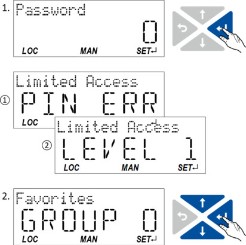
 key to skip the log-in.
 and
and  to select the desired group and with key
  key you can navigate one level upwards again anytime.
|
|
1.
Use the key to enter the defined PIN.
2.
Use the key to accept the changed setting.
If the access remains restricted, it is briefly displayed: ① PIN ERR: No write access ② LEVEL 1: Write access only to favorites You are now in the group level. 3.
You can now use the navigation keys and to select the desired group and with key navigate one level lower to the parameter level.
Note: By using the key you can navigate one level upwards again anytime. |
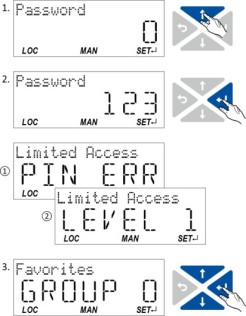

After 10 invalid entries, the log-in function is inhibited. In order to remove the log-in inhibit, the inverter must be switched off and on again.
The write access protection gets active again:
–
Automatically 10 minutes after the last log-in or the last keypad entry.
–
Automatically after the mains voltage is switched on again.
Configuring the write access protection with the keypad
The write access protection is activated by defining PIN1 in P730.00 and/or PIN2 in P731.00 (depending on the desired configuration of the write access protection).
In the following example, the write access protection is configured in such a way that a write access to the favorites only is possible or (when knowing PIN) to all parameters. This configuration only requires the definition of PIN1 (here: "123").
|
|
Defining PIN1:
1.
Use the key in the operating mode to navigate to the parameterisation mode one level below.
You are now in the group level. Note: By using the key you can navigate one level upwards again anytime. 2.
Use the navigation key to select group 7.
3.
Use the key to navigate to one level below.
You are now in the parameter level of the group selected. 4.
Use the navigation key to select the P730.00 parameter.
5.
Use the key to navigate to one level below.
You are now in the editing mode. 6.
Use the navigation key to set PIN1 to the value "123".
7.
Use the key to accept the changed setting.
The editing mode is exited. Note: The configured access protection only gets effective after the parameter group is quit. |
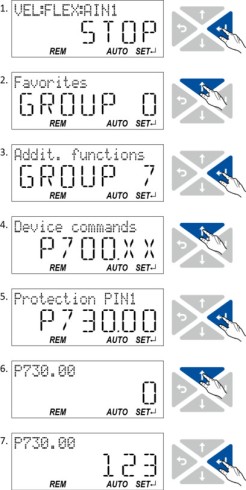
In the following example, PIN1 is changed from "123" to "456". For this purpose, the defined PIN must first be deleted by the setting "0".
|
|
Change defined PIN1:
1.
Use the key in the operating mode to navigate to the parameterisation mode one level below.
Since the access protection is active, the input dialog for the PIN is displayed. 2.
Use the navigation key to set PIN "123" to remove the access protection temporarily.
3.
Use the key to accept the entered PIN.
You are now in the group level. 4.
Use the navigation key to select group 7.
5.
Use the key to navigate to one level below.
You are now in the parameter level of the group selected. 6.
Use the navigation key to select the P730.00 parameter.
7.
Use the key to navigate to one level below.
You are now in the editing mode. 8.
Use the key to set PIN1 to the value "0". This setting first deletes PIN1.
9.
Use the key to accept the changed setting.
The editing mode is exited. 10.
Use the key to navigate again one level below to the editing mode.
11.
Use the navigation key t set the previously deleted PIN1 to the new value "456".
12.
Use the key to accept the changed setting.
The editing mode is exited. Note: The configured access protection only gets effective after the parameter group is quit. |
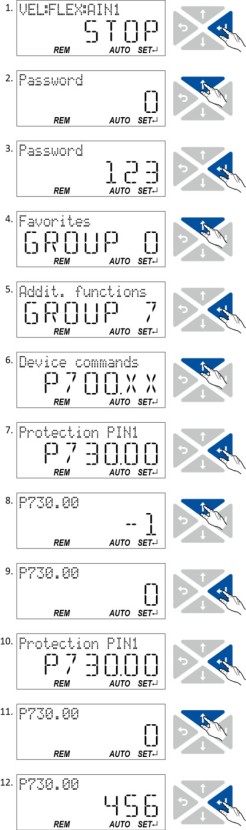
How to remove a configured write access protection permanently:
1.
Remove the active write access protection temporarily (see above).
2.
Set PIN1 (P730.00) and PIN2 (P731.00) to the value "0" (see instructions for changing the PIN).
Impact of the write access protection to the keypad functions
The following keypad functions are supported irrespective of the active write access protection:
–
Optical device identification 0x2021:001 (P230.01)
–
Resetting parameters to default 0x2022:001 (P700.01)
–
Load user parameter 0x2022:004 (P700.04)
–
Load OEM parameter 0x2022:005 (P700.05)