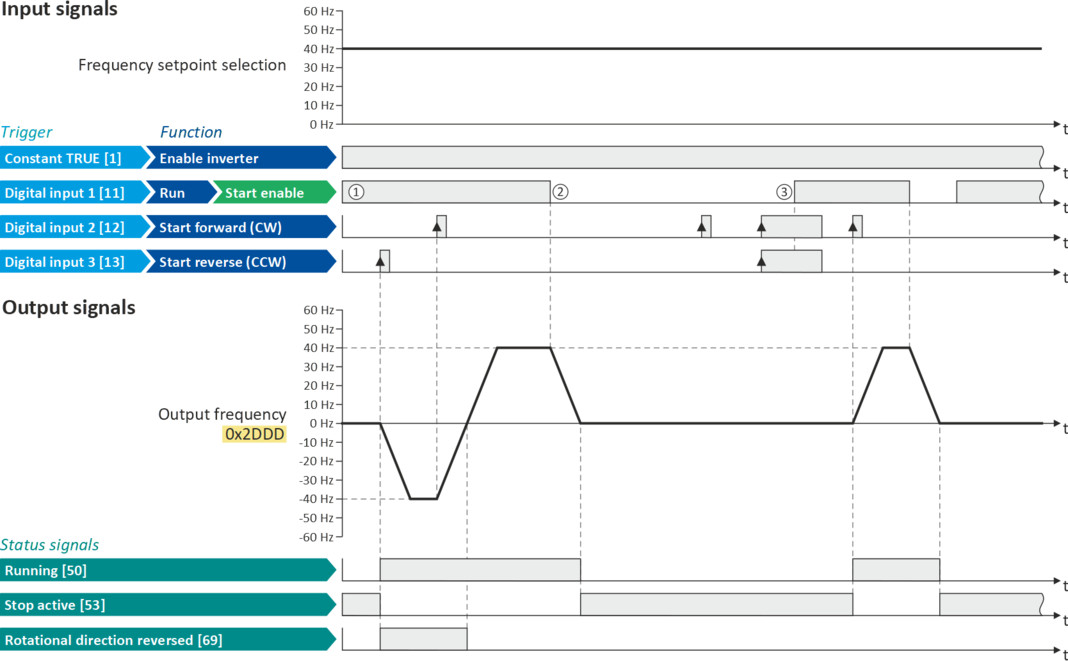
Example: Start forward/start reverse/stop (edge-controlled)

The "Run" function automatically becomes a "start enable" if the functions "Start forward (CW)"/"Start reverse (CCW)" are connected to triggers.
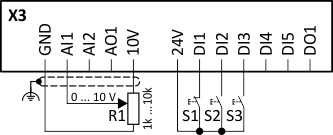
This example shows an edge-controlled start/stop via three buttons:
–
In the non-operating state of button S1 (normally-closed contact), there is already a start enable.
–
Button S2 starts the motor in forward rotating direction.
–
Button S3 starts the motor in the reverse rotating direction.
–
Button S1 (normally-closed contact) stops the motor by (momentary) cancellation of the start enable. The inverter then waits for the next start command via button S2/S3.
|
Connection diagram
|
Function
|
|
|
|
Potentiometer R1
|
Frequency setpoint selection
|
|
Button S1
|
Stop
|
|
|
Button S2
|
Start forward (CW)
|
|
|
Button S3
|
Start reverse (CCW)
|
|
|
Parameter
|
Name
|
Setting for this example
|
|
Enable inverter
|
Constant TRUE [1]
|
|
|
Run
|
Digital input 1 [11]
|
|
|
Reset fault
|
Not connected [0]
|
|
|
Start forward (CW)
|
Digital input 2 [12]
|
|
|
Start reverse (CCW)
|
Digital input 3 [13]
|
|
|
Reverse rotational direction
|
Not connected [0]
|
|
The status signals can be assigned to digital outputs.
 Configure digital outputs Configure digital outputs |
|
|
|
|
|
①
|
The "Run" function serves as start enable for the functions "Start forward (CW)" and "Start reverse (CCW)".
Without start enable, the motor cannot be started.
|
|
②
|
If the start enable is cancelled, the motor is stopped with the stop method set in 0x2838:003 (P203.03). In the example: Stop with standard ramp.
|
|
③
|
If, at start enable, "Start forward (CW)" and "Start reverse (CCW)" are already set to TRUE, the motor remains stopped and the inverter waits for the next valid start edge.
|