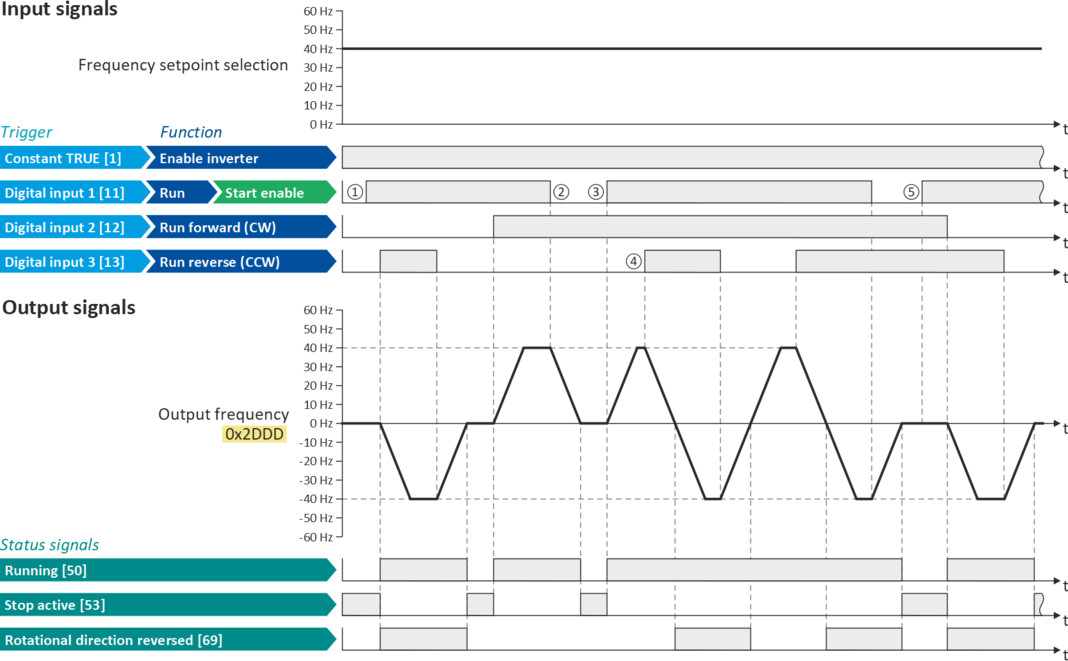
Example: Run forward/Run reverse/stop (status-controlled)

The "Run" function automatically becomes a "start enable" if the functions "Run forward (CW)"/"Run reverse (CCW)" are connected to triggers.
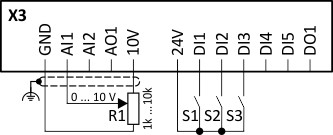
This example shows a status-controlled start/stop via three switches:
–
Switch S1 enables the start. Without start enable, the motor cannot be started.
–
Switch S2 starts the motor in forward direction of rotation.
–
Switch S3 starts the motor in backward direction of rotation.
–
The motor is stopped by cancelling the run commands (switches S2 and S3 open) or by cancelling the start enable (switch S1 open).
|
Connection diagram
|
Function
|
|
|
|
Potentiometer R1
|
Frequency setpoint selection
|
|
Switch S1
|
Start enable
|
|
|
Switch S2
|
Run forward (CW)
|
|
|
Switch S3
|
Run reverse (CCW)
|
|
|
Parameter
|
Name
|
Setting for this example
|
|
Enable inverter
|
Constant TRUE [1]
|
|
|
Run
|
Digital input 1 [11]
|
|
|
Reset fault
|
Not connected [0]
|
|
|
Run forward (CW)
|
Digital input 2 [12]
|
|
|
Run reverse (CCW)
|
Digital input 3 [13]
|
|
|
Reverse rotational direction
|
Not connected [0]
|
|
The status signals can be assigned to digital outputs.
 Configure digital outputs Configure digital outputs |
|
|
|
|
|
①
|
The "Run" function serves as start enable for the functions "Run forward (CW)" and "Run reverse (CCW)".
Without start enable, the motor cannot be started.
|
|
②
|
If the start enable is cancelled, the motor is stopped with the stop method set in 0x2838:003 (P203.03). In the example: Stop with standard ramp.
After a renewed start enable, the inverter waits for the next run command.
|
|
③
|
If, at start enable, either "Run forward (CW)" or "Run reverse (CCW)" is set to TRUE, the motor starts in the triggered direction.
|
|
④
|
The inverter always responds to the run command detected last (if start enable is available).
In the example, the "Run reverse (CCW)" command replaces the still active "Run forward (CW)" command.
|
|
⑤
|
If, at start enable, both run commands are set to TRUE, the motor remains stopped until only one valid run command is available.
|