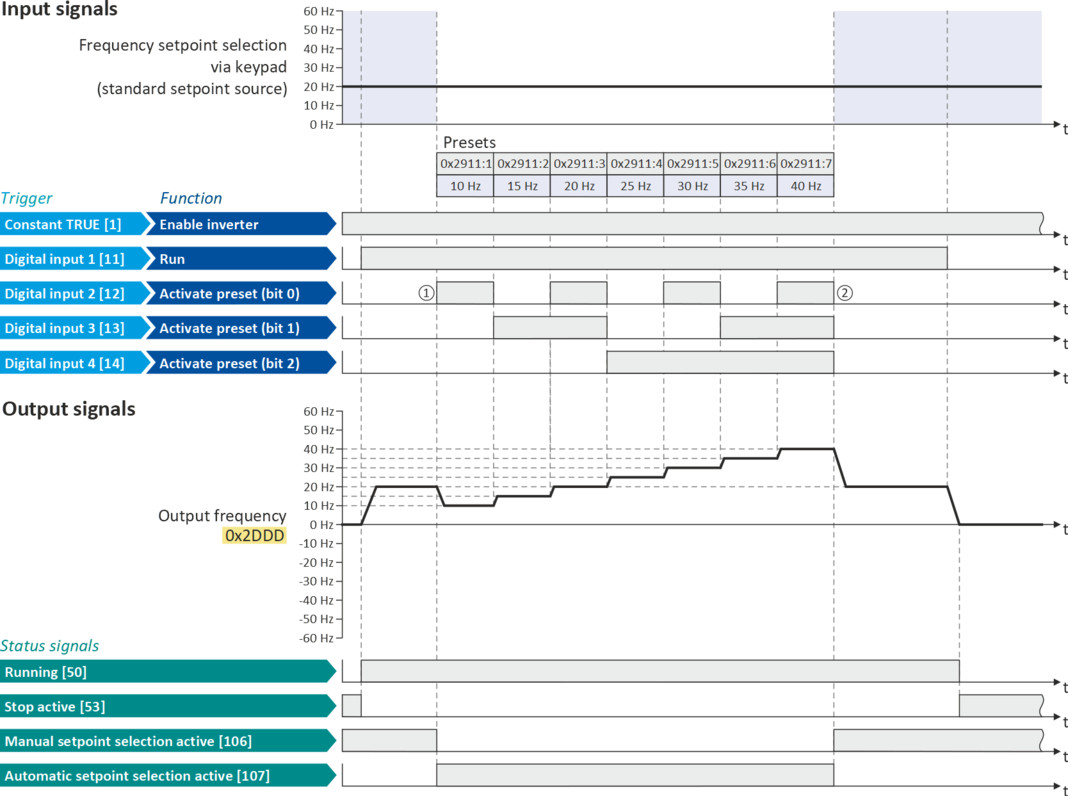
Example: Change-over from keypad setpoint to preset 1 ... 7
The four functions "Activate preset (bit 0)" ... " Activate preset (bit 3)" enable change-over of the setpoint to a parameterisable setpoint (preset value).
Details
A preset is selected in a binary-coded fashion via the triggers assigned to the four functions "Activate preset
(Bit 0)" ... " Activate preset (Bit 3)" in compliance with the following truth table:
|
Activate preset
|
Selection
|
||||||
|
Bit 3
|
Bit 2
|
Bit 1
|
Bit 0
|
Preset
|
Frequency setpoint
|
PID setpoint
|
Torque setpoint
|
|
FALSE
|
FALSE
|
FALSE
|
FALSE
|
No preset selected
|
|||
|
FALSE
|
FALSE
|
FALSE
|
TRUE
|
Preset 1
|
|||
|
FALSE
|
FALSE
|
TRUE
|
FALSE
|
Preset 2
|
|||
|
FALSE
|
FALSE
|
TRUE
|
TRUE
|
Preset 3
|
|||
|
FALSE
|
TRUE
|
FALSE
|
FALSE
|
Preset 4
|
|||
|
FALSE
|
TRUE
|
FALSE
|
TRUE
|
Preset 5
|
|||
|
FALSE
|
TRUE
|
TRUE
|
FALSE
|
Preset 6
|
|||
|
FALSE
|
TRUE
|
TRUE
|
TRUE
|
Preset 7
|
|||
|
TRUE
|
FALSE
|
FALSE
|
FALSE
|
Preset 8
|
|||
|
TRUE
|
FALSE
|
FALSE
|
TRUE
|
Preset 9
|
|||
|
...
|
...
|
...
|
|||||
|
TRUE
|
TRUE
|
TRUE
|
TRUE
|
Preset 15
|
|||
Example for operating mode
–
The keypad is set as standard setpoint source.
–
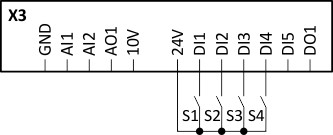
Switch S1 starts the motor in forward direction of rotation. Switch S1 in initial position stops the motor again.
–
The switches S2 ... S4 serve to switch over to the presets 1 ... 7 (see the following table).
|
Connection diagram
|
Function
|
||||
|
|
Switch S1
|
Run
|
|||
|
Switch S2 ... S4
|
Preset selection:
|
||||
|
S2
|
S3
|
S4
|
|
||
|
Off
|
Off
|
Off
|
Keypad setpoint
|
||
|
On
|
Off
|
Off
|
Preset value 1
|
||
|
Off
|
On
|
Off
|
Preset value 2
|
||
|
On
|
On
|
Off
|
Preset value 3
|
||
|
Off
|
Off
|
On
|
Preset value 4
|
||
|
On
|
Off
|
On
|
Preset value 5
|
||
|
Off
|
On
|
On
|
Preset value 6
|
||
|
On
|
On
|
On
|
Preset value 7
|
||
|
Parameter
|
Name
|
Setting for this example
|
|
Enable inverter
|
Constant TRUE [1]
|
|
|
Run
|
Digital input 1 [11]
|
|
|
Reset fault
|
Not connected [0]
|
|
|
Reverse rotational direction
|
Not connected [0]
|
|
|
Activate preset (bit 0)
|
Digital input 2 [12]
|
|
|
Activate preset (bit 1)
|
Digital input 3 [13]
|
|
|
Activate preset (bit 2)
|
Digital input 4 [14]
|
|
|
Control selection
|
Flexible I/O configuration [0]
|
|
|
Stop method
|
Standard ramp [1]
|
|
|
Frequency control: Default setpoint source
|
Keypad [1]
|
|
|
Frequency setpoint presets: Preset 1
|
10 Hz
|
|
|
Frequency setpoint presets: Preset 2
|
15 Hz
|
|
|
Frequency setpoint presets: Preset 3
|
20 Hz
|
|
|
Frequency setpoint presets: Preset 4
|
25 Hz
|
|
|
Frequency setpoint presets: Preset 5
|
30 Hz
|
|
|
Frequency setpoint presets: Preset 6
|
35 Hz
|
|
|
Frequency setpoint presets: Preset 7
|
40 Hz
|

If the frequency presets 8 ... 15 are required as well, the digital input 5 must be additionally assigned to the "Activate preset (bit 3)" function and the terminal DI5 must be interconnected accordingly.
|
The status signals can be assigned to digital outputs.
 Configure digital outputs Configure digital outputs |
|
|
|
|
|
①
|
Changeover from keypad setpoint (standard setpoint source) to presets (first, preset 1 is selected).
|
|
②
|
Changeover back to keypad setpoint since no preset is selected anymore (digital inputs 2 ... 4 = FALSE).
|