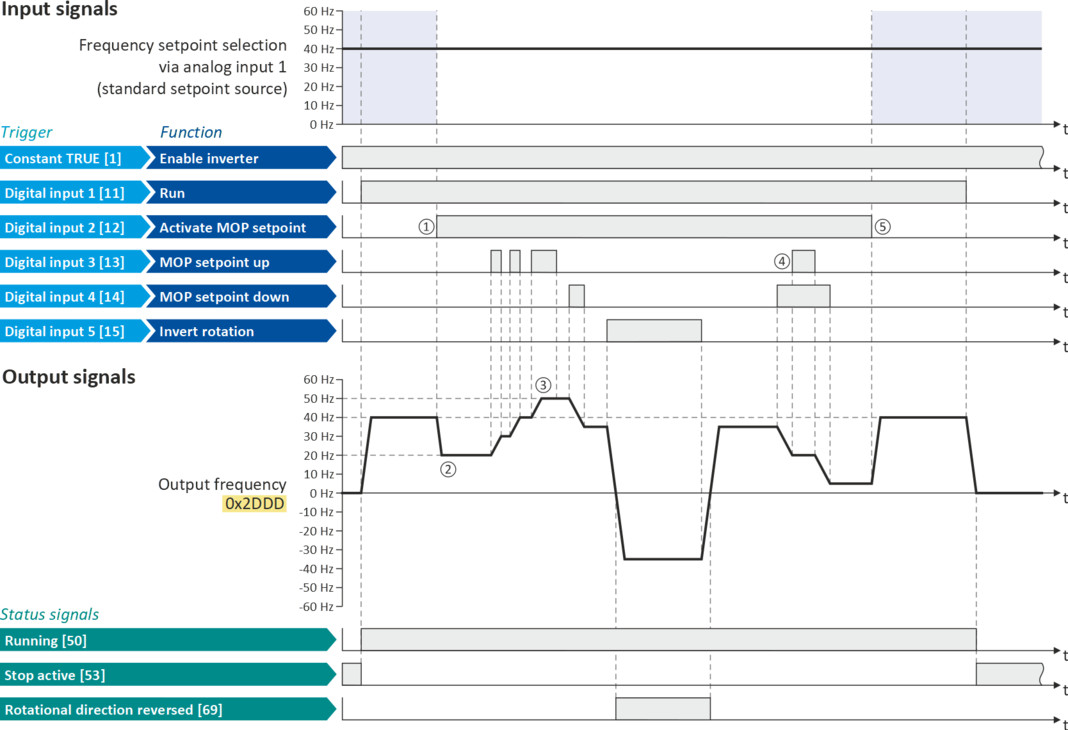
Example: Change-over from AI1 setpoint to MOP setpoint
The "Activate MOP setpoint" function enables a setpoint change-over to the motor potentiometer during operation.
Preconditions
A setpoint change-over to the motor potentiometer is only effected if
–
no setpoint source with a higher priority has been selected.  Priority of the setpoint sources
Priority of the setpoint sources –
no jog operation is active ("Jog forward (CW)" and "Jog reverse (CCW)" functions).
Example for operating mode
–
The analog input 1 is set as standard setpoint source.
–
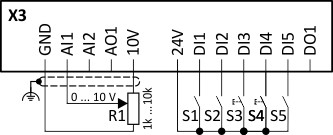
Switch S1 starts the motor in forward direction of rotation. Switch S1 in initial position stops the motor again.
–
Switch S2 activates the motor potentiometer as setpoint source. The MOP setpoint can then be increased via key S3 and decreased via key S4. When both pushbuttons are pressed simultaneously, the MOP setpoint remains unchanged.
–
Switch S5 switches the direction of rotation.
|
Connection diagram
|
Function
|
|
|
|
Potentiometer R1
|
Frequency setpoint selection
|
|
Switch S1
|
Run
|
|
|
Switch S2
|
Activate MOP setpoint
|
|
|
Button S3
|
MOP setpoint up
|
|
|
Button S4
|
MOP setpoint down
|
|
|
Switch S5
|
Reverse rotational direction
|
|
|
Parameter
|
Name
|
Setting for this example
|
|
Enable inverter
|
Constant TRUE [1]
|
|
|
Run
|
Digital input 1 [11]
|
|
|
Activate MOP setpoint
|
Digital input 2 [12]
|
|
|
MOP setpoint up
|
Digital input 3 [13]
|
|
|
MOP setpoint down
|
Digital input 4 [14]
|
|
|
Reverse rotational direction
|
Digital input 5 [15]
|
|
|
Control selection
|
Flexible I/O configuration [0]
|
|
|
Stop method
|
Standard ramp [1]
|
|
|
Frequency control: Default setpoint source
|
Analog input 1 [2]
|
|
|
Acceleration time 1
|
1.0 s
|
|
|
Deceleration time 1
|
1.0 s
|
|
|
Acceleration time 2
|
4.0 s (for MOP setpoint change)
|
|
|
Deceleration time 2
|
4.0 s (for MOP setpoint change)
|
|
|
MOP starting mode
|
Starting value [1]
|
|
|
MOP starting values: Frequency
|
20 Hz
|
|
The status signals can be assigned to digital outputs.
 Configure digital outputs Configure digital outputs |
|
|
|
|
|
①
|
Changeover from analog input 1 (standard setpoint source) to MOP setpoint.
|
|
②
|
The initial value for the motor potentiometer function depends on the setting in 0x4003 (P413.00).
In this example, the "starting value" set in 0x4004:001 (P414.01) is used (here: 20 Hz).
|
|
③
|
The MOP setpoint is increased to a maximum of the maximum frequency set in 0x2916 (P211.00) (here: 50 Hz).
|
|
④
|
If "MOP setpoint up" and "MOP setpoint down" are requested at the same time, the MOP setpoint remains unchanged.
|
|
⑤
|
Changeover from MOP setpoint back to analog input 1 (standard setpoint source).
|