Data Storage
The "Data Storage"mechanism allows for a consistent and current buffering of IO-Link device parameters on higher levels such as PLC programs or IO-Link fieldbus master. The data storage between IO-Link master and IO-Link device is defined in the IO-Link standard whereas the adjacent upper "Data Storage"mechanisms depend on the respective fieldbus or system. A IO-Link device is provided with a standardised set of objects which contains information on parameters for data storage, e.g. requirements regarding the memory size and control and status information of the "Data Storage"mechanism. Revisions of"Data Storage"parameter sets are identified via a parameter checksum.
Purpose and aims
The main purpose of the "Data Storage" mechanism is to automatically configure the new device correctly when the IO-Link device is replaced.
After a "Backup" level is activated, a "defective" IO-Link device can be replaced by a compatible IO-Link device or one appropriate to the type. In only a few exceptional cases, user intervention is required to ensure the same functionality and performance.
Preconditions for the activation of the "Data Storage"mechanism
–
IO-Link device and IO-Link master must be implemented according to the IO-Link specification V1.1.
–
The "Backup" level of this master port must either be "Backup/Restore" or "Restore”.
"Data Storage" class 1: automatic data storage
The configured IO-Link device supports the data storage in such a way that the replacement IO-Link device takes over the role of the predecessor fully automatically and if possible with the same performance (motor identification might be required).
Preconditions for parameter sets
Each IO-Link device operates with the configured active parameters. The related set of safety parameters stored in the system (IO-Link master and/or higher-level system, e.g. PLC) may differ from the set of active parameters.
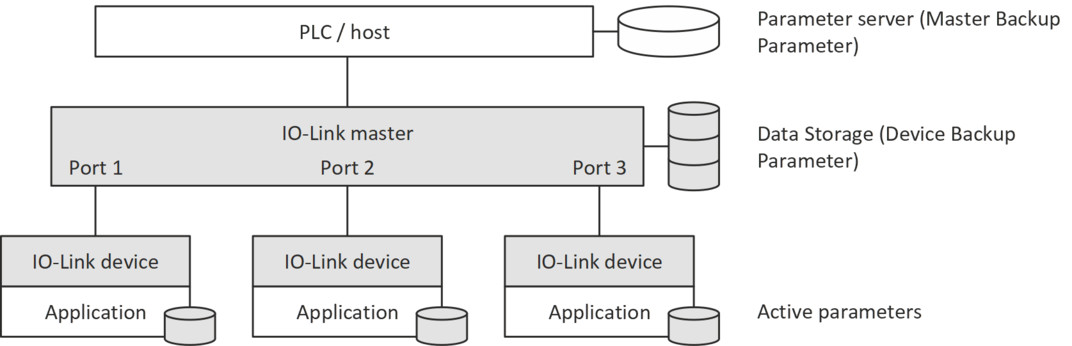
A replacement of the IO-Link device in operation causes the available parameters to be overwritten by the backup parameters within the newly connected IO-Link devices.
General principle of the data storage
The "DS_UPLOAD_FLAG" bit shows parameter changes in an IO-Link device,
–
"DS_UPLOAD_FLAG" = FALSE: No change to the parameter set of the IO-Link device.
–
"DS_UPLOAD_FLAG" = TRUE: Change to the parameter set of the IO-Link device.
States of the "DS_UPLOAD_FLAG" bit
|
"DS_UPLOAD_FLAG"
|
Condition
|
Note
|
|
TRUE
|
The "Save user data" device command is activated, 0x2022:003 (P700.03) = TRUE
|
The save command sets "DS_UPLOAD_FLAG" from "FALSE" to "TRUE".
|
|
FALSE
|
After a complete parameter backup process, IO-Link master "DS_UPLOAD_FLAG" is set automatically to "FALSE".
|
General behavior of the IO-Link master.
|
|
FALSE
|
The sequential device commands "Load default settings" (0x2022:001 (P700.01) = TRUE) and "Save user data" (0x2022:003 (P700.03) = TRUE) set "DS_UPLOAD_FLAG" to "FALSE".
|
"Device replacement" application where an IO-Link device is loaded with a different parameter set than "standard settings".
|
"Backup” level in detail
The data memory function is controlled by the user via "Backup" level.

The "Backup" level are always set in the IO-Link master.
The IO-Link master has these "Backup" levels:
|
|
IO-Link master Variant 1
|
IO-Link master Variant 2
|
|
Available "Backup" level
|
"Disable"
|
"Disable"
|
|
"Backup"
|
"Backup/Restore"
|
|
|
"Restore"
|
"Restore"
|
|
Application
|
Description
|
"Backup" level
|
"DS_UPLOAD_FLAG"
|
|
Commissioning
|
The "Data Storage" is deactivated in the commissioning phase where configurations, parameter settings and PLC programs are coordinated, tested and reviewed. Data exchange between IO-Link master and IO-Link device is not supported.
|
"Disable"
|
Not relevant
|
|
Change from commissioning to production
|
The "Data Storage" will be activated after successful commissioning. The parameters currently active in the IO-Link device are copied and saved as backup parameters on the IO-Link master.
Start backup:
Execute the "Save user data" device command, 0x2022:003 (P700.03) = TRUE
|
"Backup"
|
TRUE
Will be set to FALSE again by the master when backup is successful.
|
|
Production
|
While the IO-Link device is monitored or operated, no parameter changes in the IO-Link device are accepted.
|
"Restore"
|
Not relevant
|
|
IO-Link device replacement
|
The stored backup parameters in the IO-Link master overwrite the active parameters (e.g. default settings) in the replaced compatible IO-Link device of the same type.
After a restart, the new IO-Link device operates with the same parameters as its predecessor.
|
"Restore"
|
Not relevant
|
The user must observe the status of the "DS_UPLOAD_FLAG" in every single application listed below:
|
Application
|
Description
|
"Backup" level
|
"DS_UPLOAD_FLAG"
|
|
Commissioning
|
The "Data Storage" is deactivated in the commissioning phase where configurations, parameter settings and PLC programs are coordinated, tested and reviewed. Data exchange between IO-Link master and IO-Link device is not supported.
|
"Disable"
|
Not relevant
|
|
Change from commissioning to production
|
The "Data Storage" will be activated after successful commissioning. The parameters currently active in the IO-Link device are copied and saved as backup parameters on the IO-Link master.
Start backup:
Execute the "Save user data" device command, 0x2022:003 (P700.03) = TRUE
|
»Backup/Restore«
|
TRUE
|
|
Production
|
While the IO-Link device is monitored or operated, no parameter changes in the IO-Link device are accepted.
|
"Backup/Restore"
|
FALSE
|
|
IO-Link device replacement
|
The stored backup parameters in the IO-Link master overwrite the active parameters (e.g. default settings) in the replaced compatible IO-Link device of the same type.
After a restart, the new IO-Link device operates with the same parameters as its predecessor.
|
"Backup/Restore"
|
|
|
Application 1: IO-Link device "Out of the Box":
After a restart, the new IO-Link device operates with the same parameters as its predecessor.
|
FALSE
|
||
|
Application 2: IO-Link device with parameter set deviating from the default settings:
"DS_UPLOAD_FLAG" = TRUE
The sequential device commands "Load default settings" (0x2022:001 (P700.01) = TRUE) and "Save user data" (0x2022:003 (P700.03) = TRUE) set "DS_UPLOAD_FLAG" to "FALSE".
After a restart, the new IO-Link device operates with the same parameters as its predecessor.
|
TRUE
» FALSE |
Device access lock
The device access lock serves to deactivate various IO-Link device functions according to the IO-Link standard. The i550 only knows one function:
–
"Data Storage" (required if the device supports data storage)
If the bit is set in the IO-Link device , the "data storage" mechanism is deactivated. The IO-Link device reacts to a write access with a negative service response - access denied. The read access is not affected.