External travel profile parameters
External travel profile parameters can be transferred via the network interface.
The travel profile to be changed can be selected in the Control signals parameter.  0x5030:010, Bit 16 ... Bit 19
The selected travel profile defines the external travel profile parameters.
Existing data in the selected travel profile are overwritten when the external values are accepted.
In the selected profile data set, the following parameters can be replaced by external profile data:
1.
External position: Activate external setpoint position 0x5030:010, bit 28
0x5030:010, bit 28 2.
External speed: Activate external setpoint speed 0x5030:010, bit 29
0x5030:010, bit 29 3.
External acceleration, deceleration and jerk: Activate external acceleration/deceleration/jerk 0x5030:010, bit 30
0x5030:010, bit 30The parameters can be combined. This makes it possible to change just the external setpoint position or to accept all external setpoints within the profile.
Alternatively, the acceptance of the profile data can be linked to the level of the Start positioning bit. 0x5030:010 Bit 20
This can be activated with the Read external profile data in edge-controlled manner selection parameter. 0x5030:150
0x5030:150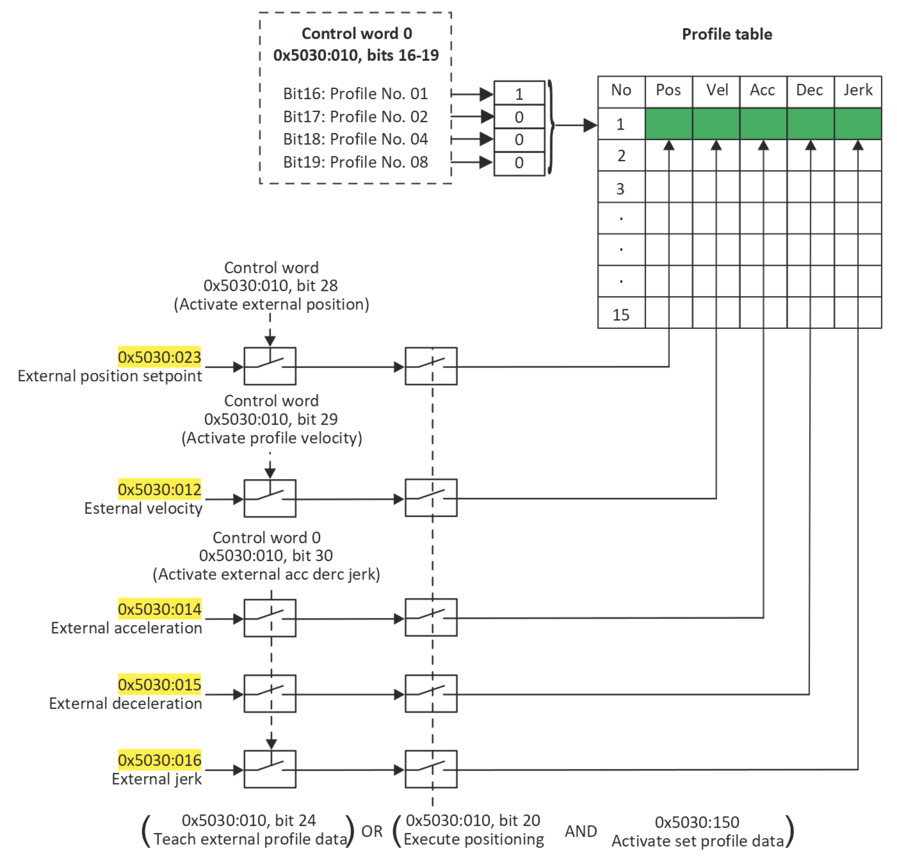
Fig. 1: Accepting external profile data
Parameter