Handling NTP
This example describes how a system must be configured so that a controller can use the NTP protocol for datetime synchronization to a NTP Server in a higher-level network segment that is separated by an IT/OT gateway.
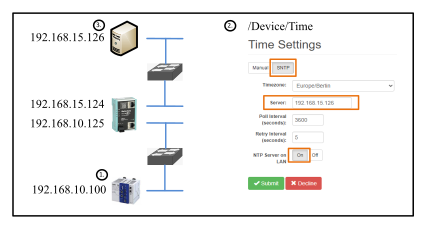
Handling NTP
(1) Configuration of the Controller
-
Set the parameter 0x245B:001 `System time: Time base`to NTP.
-
Set the parameter 0x245A:002 `NTP server addresses: NTP server address 1` to 192.168.10.125. This is the southbound address on the IT/OT-Gateway for the LAN network.
(2) Setup the Device Time on the IT/OT-Gateway
-
Activate the SNTP communication on the northbound WAN interface.
-
Set the server ip address in this example to 192.168.15.126.
-
Activate NTP Server on LAN
(3) Configuration of the NTP Server
There are a lot of possibilities to set up an NTP Server. In the following lines, a scheme is shown for an ntpsec server based on an Ubuntu Linux distribution.
-
Disable the local time synchronization service systemd-timesyncd.service
-
Remove (if existing) the ntp
-
Install ntpsec
-
Configure the NTPsec Client in the `/etc/ntpsec/ntp.conf`file.
Choose a nearby pool.
-
Configure the NTPsec Server in the `/etc/ntpsec/ntp.conf`file.
Enable certificates for secure datetime transport.