Handling SysLog
This example describes how a system must be configured so that a controller can send SysLog messages to a SysLog Server in a higher-level network segment that is separated by an IT/OT gateway.
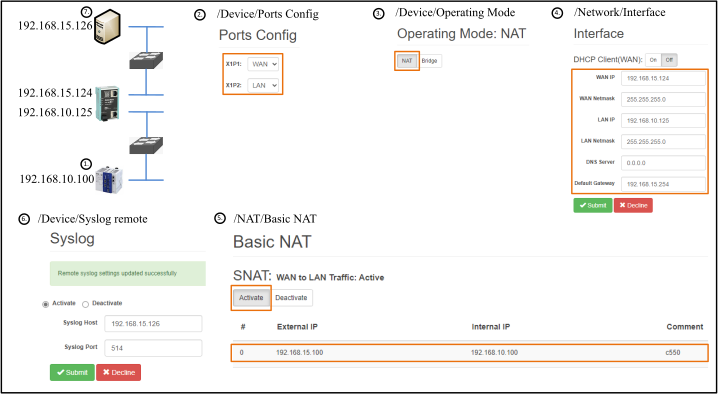
Handling SysLog
(1) Configuration of the Controller
-
Set the network address of the controller to 192.168.10.100 with subnet 255.255.255.0 and gateway 192.168.10.125.
-
Set the network address for the SysLog Server to 192.168.15.126 with the port tcp/5140.
(2) Port Configuration of the IT/OT Gateway
-
Set Port 1 to WAN and Port 2 to LAN in the `/Device/Ports Config` menu.
(3) Activate NAT on the IT/OT Gateway
-
Activate NAT in the `/Device/Operating Mode` menu.
(4) Setup the Network Interfaces on the IT/OT Gateway
-
Set the network configuration for WAN and LAN in the `/Network/Interface`menu.
(5) Configuration of the Basic NAT on the IT/OT Gateway
-
Activate and configure the Basic NAT via the `/NAT/Basic NAT`menu.
-
Add a NAT rule for the internal (real) controller IP `192.168.10.100` to the external (virtual) IP `192.168.15.100`.
(6) Configuration of the SysLog remote functionality of the IT/OT Gateway
-
Activate the IT/OT Gateway's own syslog logging to the SysLog Server address 192.168.15.126 on port 514.
(7) Configuration of the SysLog Server
There are a lot of possibilities to set up a SysLog Server. In the following lines, a scheme is shown for an rsyslog SysLog server based on an Ubuntu Linux distribution.
-
Install the rsyslog package.
-
Configure the `/etc/rsyslog.conf file`
- Activate the syslog reception via udp/514.
- Activate the syslog reception via tcp/5140.
- Setup the rules for facilities and severities and the log files
-
Add template files in `/etc/rsyslog.d/`
- Generate a file for each device if you want to separate the log files
-
Install logrotate.
-
Configure `/etc/logrotate.conf`
- Choose the rotate cycle and the creation process of the rotation files
-
Configure `/etc/logrotate.d/rsyslog`
- Add all logfiles for logrotate