Controller.LeastFunctionality
The Controller has the feature of Least Functionality from firmware version 2.0.0 on. This means that functions that are not absolutely necessary for the core functions of the controller are deactivated by default and must be activated by the user if required. A distinction is made here between the functionality of the Firewall (access to the service, refer to chapter Controller.Firewall) and the existence of the service itself.
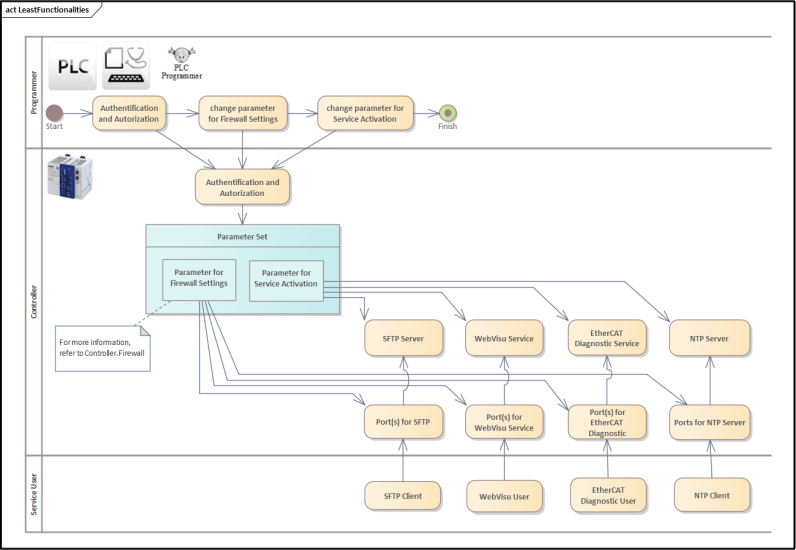
Activity Diagram of Least Functionalities
Service "SFTP/SCP Server"
|
Address |
Name |
Info |
|
|---|---|---|---|
|
0x5915:003 |
Least Functionality: SFTP Server |
|
|
|
0 |
Deactivated [default] |
SFTP/SCP Server is deactivated |
|
|
1 |
Activated |
SFTP/SCP Server is activated |
|
This parameter is used to activate or deactivate the "SFTP/SCP Server" service, which is deactivated by default.
This service is also automatically started if a Lenze Application Engineer uses the ssh-enable key on the SD Card. In this case the parameter does not change to "1: Activated". But this service is for Lenze-Application-Engineers only and not the customer.
This service is deactivated by setting the parameter 0x5915:003 to enumeration [0]. This deactivation is carried out immediately. This service is activated by setting the parameter 0x5915:003 to enumeration [1]. This activation is carried out immediately.
Services for "Web Visu"
|
Address |
Name |
Info |
|
|---|---|---|---|
|
0x5915:001 |
Least Functionality: UI Designer Access |
|
|
|
0 |
Deactivated [default] |
UI Designer Access is deactivated. |
|
|
1 |
Activated |
UI Designer Access is activated. |
|
| 0x5915:002 | Least Functionality: UI Gateway and Runtime | ||
|
0 |
Deactivated [default] |
UI Gateway and Runtime is deactivated. |
|
|
1 |
Activated |
UI Gateway and Runtime is activated. |
|
|
0x5915:005 |
Least Functionality: WebAccess |
Web Access combines HA Proxy and lighttpd. |
|
|
0 |
Deactivated [default] |
Web Access is deactivated. |
|
|
1 |
Activated |
Web Access is activated. |
|
These parameters are used to activate or deactivate the "Web Access" services, which are deactivated by default.
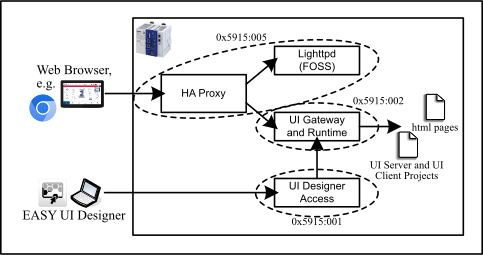
Connections between the three services
HA Proxy and Lighttpd
Security is terminated at the HAProxy, which routes traffic to multiple backend services acting as endpoints.
This HAProxy and the Lighttpd service for providing the FOSS (Free and Open Source Software) is deactivated by setting the parameter 0x5915:005 to enumeration [0]. This deactivation is carried out immediately. This service is activated by setting the parameter 0x5915:005 to enumeration [1]. This activation is carried out immediately.
UI Gateway and Runtime
The service UI Gateway and Runtime sits architecturally behind the HA Proxy. So if the user needed the UI Gateway for accessing the Web Visualization Pages, the user has to activate the HAProxy and the UI Gateway and Runtime service.
This service is deactivated by setting the parameter 0x5915:002 to enumeration [0]. This deactivation is carried out immediately. This service is activated by setting the parameter 0x5915:002 to enumeration [1]. This activation is carried out immediately.
UI Designer Access
The third service is the UI Designer Access. The service is required if the user wants to access the UI Designer with the help of the Target Device Manager or the Server Manager UI to change visualization projects.
This service is deactivated by setting the parameter 0x5915:001 to enumeration [0]. This service is activated by setting the parameter 0x5915:001 to enumeration [1]. The activation or deactivation is not applied immediately, but only after one of the following actions has been performed:
-
Reboot of the Controller
(recommended) -
Disable and then re-enable parameter 0x5915:002 "Least Functionality: UI Gateway and Runtime."
(can be used as a workaround) -
Stop and restart the server project from the UI Runtime project
(not recommended, as this is difficult to implement if the UI Designer cannot go online.)
Service "EtherCAT Diagnostics"
|
Address |
Name |
Info |
|
|---|---|---|---|
|
0x5915:004 |
Least Functionality: EtherCAT Master Diagnostic |
|
|
|
0 |
Deactivated [default] |
EtherCAT Diagnostics is deactivated. |
|
|
1 |
Activated |
EtherCAT Diagnostics is activated. |
|
To use the Lenze EtherCAT Master Diagnosis Tool (included in the PLC Designer installation), the EtherCAT Diagnostic service must first be started on the Controller. This parameter is used to activate or deactivate the "EtherCAT Diagnostics" service, which is deactivated by default.
This service can be activated and deactivated using the parameter 0x5915:004. If the parameter is set to enumeration [0], the service is deactivated at the next boot and if the parameter is set to enumaration [1], the service is activated at the next boot. The changes only take effect after a restart, not immediately.
Before this service is started and the port is enabled via the Controller.Firewall, the user must carry out a security risk assessment. The background to this is that the Lenze EtherCAT Master Diagnosis Tool can be used to directly access the EtherCAT master of the Controller. There is no prior authentication and therefore no necessary authorization.
Service "NTP Server"
|
Address |
Name |
Info |
|
|---|---|---|---|
|
0x245B:003 |
System time: NTP server |
|
|
|
0 |
Deactivated [default] |
NTP Server is deactivated. |
|
|
1 |
Activated |
NTP Server is activated. |
|
This parameter is used to activate or deactivate the "NTP Server" service, which is deactivated by default.
This service is deactivated by setting the parameter 0x245B:003 to enumeration [0]. This deactivation is carried out immediately. This service is activated by setting the parameter 0x245B:003 to enumeration [1]. This activation is carried out immediately.